Mostrando postagens com marcador asus. Mostrar todas as postagens

domingo, 1 de fevereiro de 2015

CES 2015: Asus unveils the Zenfone 2: $199 Flagship


A flagship smartphone starting at $199? Is that even possible? Well, Asus appears to have achieved it, according to their CES 2015 announcement of their new Zenfone 2 smartphone. Basically, the Zenfone 2 has specs that put it right on flagship territory, however, it's price tag is similar to mid-range phones. Costing as little as $199 before taxes, the Zenfone 2 might just have the most bang for the buck we've seen for a phone since the Moto G.

Asus' new smartphone has many variants at different price points, and instead of offering only variants with different storage capacities like most phones, the Zenfone 2 is available in different configurations for storage, RAM, and even processor speed. Of course, the $199 price tag applies to the simplest configuration, which is itself no slouch, with 16GB storage, 2GB of RAM and an Intel Z3560 processor (Quad-core 1.8GHz). Considering that most phones at this price range offer much less than that, Asus really must be congratulated for making such a good phone at this price range. 

Of course, it is very possible that Asus made some compromises to reach the low starting price for the Zenfone 2, and this can be confirmed only when the phone is actually available for purchase. For now, though, Asus has an astounding phone in their hands, at least on paper.

Asus Zenfone 2
 Body   152.5 x 77 x 10.9~3.9mm, 170g
 Display   5.5" IPS LCD fullHD (1920 x 1080, 403ppi)
 w/ Corning Gorilla Glass 3
 Data  LTE: Cat. 4 150/50 Mbps
 (FDD-LTE: Bands 1/2/3/4/5/7/8/9/17/18/19/20/28/29
 TDD-LTE: Bands 38/39/40/41)
 HSDPA
 GSM
 Connectivity   -Wireless:
 WiFi 802.11a/b/g/n/ac
 Bluetooth 4.0
 NFC
 GPS, A-GPS and GLONASS
 -Ports
 3.5mm audio jack
 microUSB 2.0 (with USB OTG)
 microSD card slot, up to 64GB
 Camera (rear)   13MP, 5-element f/2.0 lens, with dual-color LED flash. 1080p@30fps video
 Camera (front)  5MP, f/2.0 aperture lens, 85-degree wide lens
 Storage/RAM  16/32/64 GB, 2/4 GB RAM
 - Asus WebStorage: 5GB (lifetime)
 Processor  Intel Atom Z3560/Z3580 
 CPU   Quad-core Silvermont (4C/4T) 1.8GHz/2.3GHz
 GPU  PowerVR G6430 @ 533MHz (136 GFLOPS)
 OS  Android 5.0 Lollipop with Asus ZenUI
 Battery  Li-Ion 3,000 mAh, non-removable


Design


The Zenfone 2 is undeniably a beautiful phone. There are many notable details about the Zenfone 2's design, the sum of which might just make Asus' new design the best one we'll see in a while. Most notably, Asus decided to, like LG, ditch the traditional side-mounted volume keys to the back of the device, aiming a reduction in bezel width. Unlike LG's approach, though, which moves the power button to the back as well as the volume keys, Asus chose to move only the volume keys to the back, putting the power button on the top of the phone. Speaking of bezel width, Asus' new phone has exremely slim bezels, which make the phone that bit more attractive, with a relatively good screen to body ratio of 72%.

Other notable features of the design include the all-aluminium rear and the Zenfone series' signature spun metal strip on the bottom of the front of the phone. The rear of the device is entirely made of brushed metal, in a rather HTC One-like fashion, which makes for a very premium looking phone, despite the low starting price. 

ZenUI
ZenUI is what Asus calls their Android skin. Their newest version of ZenUI has Android 5.0 Lollipop on its core, the latest Android version. Overall, ZenUI is one of the best Android skins available, and is the opposite of TouchWiz. While it keeps layout and functionality close to stock, adding little bloatware, it focuses rather on changing the look of Android.

ZenUI makes Android look very sleek with a flat, modern user interface, all without being intrusive to the unexperienced user. In general, this must be one of the best Android skins, if not the best. 

Display

The Zenfone 2's display is on par with current flagships, which is very good for a phone with such a low starting price. What we have in hand is a 5.5" IPS LCD with fullHD resolution. With such a screen size, the Zenfone definitely steps into phablet territory, even if the extremely slim side bezels help reduce the phone's footprint.

If anyone's disappointed that Asus used "just" a 1080p display instead of a QHD screen: don't be. Any resolution increase from 1080p on a 5.5" phone would be very hard to notice. The difference is definitely not noticeable enough to offset the extra power consumption and performance impact that comes with QHD. At this point, it's much better to keep resolution where it is and work on other aspects of the display, and Asus' choice to keep it to 1080p might even give it a performance advantage over the competition. 

Anyways, Asus' phone ends up with a 403ppi pixel density, which should be perfectly fine unless you are trying to see some really small details. The Zenfone 2 will look as sharp as any flagship phone should look.

Processor

You can actually choose between two different processors for the Zenfone 2, depending on how much you're willing to pay for the phone. Ever so faithful to Intel, Asus has again decided to ship their flagship phone with an Atom processor, in this case, either the Z3560 or the Z3580. Since both available processor options belong to the same platform (Moorefield), both processors are physically identical, and the difference between them comes down to clock speed.

Both processors are built on a 22nm process, and include a CPU consisting of four Silvermont cores with 2MB of L2 cache. Since Silvermont is a 64-bit CPU and the Zenfone 2 runs on Android 5.0, the phone will benefit of the processor's 64-bit processing capabilities.

Also, both processors use a PowerVR G6430 GPU (same as the one on the Apple A7), with a base frequency of 457MHz and a burst frequency of 533MHz. In burst mode, the G6430's GPU can deliver a peak compute power of 136 GFLOPS, which is slightly above the Snapdragon 800's Adreno 330, but much less powerful than the Snapdragon 805's Adreno 420. The GPU is the only aspect of the Zenfone 2 which is not on par with flagships, but then again, it's hardly a slouch.

The differences between the Z3560 and the Z3580 come down to their CPU clock speed. While the Z3560 has its four cores clocked at up to 1.83GHz, the Z3580 can go all the way to 2.33GHz. That's a 500MHz increase for each core, which should definitely make a difference in usage...and in battery life. 

Conclusion

A flagship phone for $199. That is a combination most people would say is impossible. However, at least in paper, Asus really didn't cut back on any features to achieve the low price. Every aspect of this phone is flagship-level, and this achievement could make the Zenfone 2 a very successful smartphone. 

You get everything that you can possibly ask for from a flagship - A beautiful design, the latest Android version, good cameras (although 4K recording would have been appreciated), a large, high-quality, high-resolution display; a good processor too (even if not exactly among the best). All for a very low starting price. Even if the $199 version of the phone has "only" 2GB of RAM and a lower-clocked CPU, you're still getting much more than any other phone on this price range.

In general, Asus has done very well with its latest flagship. It has the specs of a flagship and the price of a mid-ranger. How that achievement will translate to sales figures is yet to be seen, but if Asus gets availability and marketing right, it's Zenfone 2 could be a huge success. 

terça-feira, 3 de dezembro de 2013

Apple iPad Air vs ASUS Transformer Pad TF701T: Tablet Comparison


The holiday season is almost upon us, and so the biggest players in the tablet market finally have their latest flagships already available. The iPad Air, from Apple, and the Transformer Pad TF701T, from ASUS, are some of the most interesting tablet flagships this holiday season. Both of them have very high-end specs, including high-resolution displays and very powerful processors, along with a high price tag. But which one is worth your money the most?

Apple iPad Air ASUS Transformer Pad
 Body   240 x 169.5 x 7.5mm, 469g (Wi-Fi)/478g (LTE)   263 x 181 x 8.9mm, 585g 
 Display   9.7" IPS LCD 2048 x 1536 (264ppi)  10.1" IPS LCD 2560 x 1600 (299ppi)
 Storage   16/32/64 GB, 1 GB RAM  32/64 GB (microSD expandable), 2GB RAM
 Connectivity   Wi-Fi, GSM (2G), HSDPA (3G), LTE (4G)  Wi-Fi
 Camera (Rear)  5 MP with F/2.4 aperture, face detection, HDR and 1080p@30fps video  5 MP with 1080p@30fps video
 Camera (Front)   1.2 MP with face detection and 720p@30fps video  1.2 MP with 720p@30fps video
 OS  iOS 7  Android 4.3 Jelly Bean
 Processor  Apple A7 (Dual-core Cyclone @ 1.4GHz + PowerVR G6430 @ 450MHz GPU)  NVIDIA Tegra 4 T40X (Quad-core Cortex-A15 @ 1.9GHz + 72-core ULP GeForce)
 Battery  Li-Po 32.4 Wh  Li-Po 31 Wh
Accessories  --  - Keyboard dock
 Starting Price   $499 (16GB)  $449 (32GB)


Design

The iPad and Transformer lines of tablets have had the most distinguished tablet designs for a long time, and the trend continues with the TF701T and the iPad Air. Unfortunately though, the TF701T has fallen behind the competition in terms of size and weight. While 2013 has ushered in a new trend of thinner and lighter tablets with narrower bezels, the Transformer tablet is still about as thin as light as its predecessors, and the bezel continues to be as wide as it can get. Of course, the unchanged bezel width is a design choice, rather than a technological incapacity to reduce it, and it at least brings the benefit of having lots of room where you can rest your thumbs without them touching the screen. 

The Transformer Pad is noticeably thicker than the iPad Air (8.9mm vs 7.5mm), but the Transformer Pad isn't exactly thick either, as it's at least slightly thinner than last year's iPad 4. The TF701T is also much heavier, weighing 585g, versus the iPad Air's 469g. Again, that doesn't mean that the TF701T is too heavy, and it's significantly lighter than the iPad 4, but it's undeniable that the iPad Air's lighter body makes it less tiring to hold and use for extended periods of time compared to the Transformer Pad. 


The Transformer Pad and the iPad Air are among the few tablets that have an aluminium construction, so they're on the same page in terms of the quality of its materials. The iPad Air, adopting the same design as the iPad mini, has an aluminium back, available in two colors: 'Space' gray and silver. The Transformer Pad also has a gray-colored aluminium back, but with a finish of concentric circles, a signature ASUS design. Like the LTE version of the iPad Air, the Transformer Pad has a plastic RF strip on the top.

Display

The iPad Air and the ASUS Transformer Pad have some of the best displays ever seen on a tablet. Both have extremely high resolutions, both get pretty bright and colors look vivid on both. 

The iPad Air has the usual 9.7" IPS display, and has a resolution of 2048 x 1536, resulting in a pixel density of 264ppi, so as expected text is razor sharp. The IPS technology also ensures a near 178-degree viewing angle and bright colors. The 4:3 aspect ratio of the display is very good for reading and web browsing, but isn't so great for watching videos because the 16:9 aspect ratio of most movies and videos result in a lot of letterboxing in the iPad's 4:3 screen. 

The Transformer Pad has a 10.1" IPS display with power-efficient IGZO technology manufactured by Sharp, with a 2560 x 1600 resolution. This resolution gives the tablet a 299ppi pixel density. While you may think that 299ppi is much sharper than 264ppi, the difference in sharpness between the two screens is barely noticeable, at least at normal viewing distances. Much like the iPad Air, the TF701T's use of IPS display technology gives it wide viewing angles and nicely saturated colors. The 16:10 aspect ratio of the Transformer Pad's screen is great for watching movies, but it makes use in portrait mode a bit awkward. 

And let's not forget about what gives the Transformer Pad its name. While the iPad Air is almost definitely a device geared towards entertainment rather than productivity, the Transformer Pad goes the other way. That's because the Transformer Pad is actually a hybrid tablet/notebook. The optional keyboard dock that ASUS sells for about $149 attaches to the tablet via the dock connector at the bottom and turns the Transformer Pad into a sort of 10.1in Android notebook. The presence of a physical keyboard obviously makes writing documents a lot easier than using onscreen keyboards, and the device's small footprint makes it very portable, so if you're into writing documents while on the go, the Transformer Pad is perfect for you.

The keyboard itself isn't very different from previous iterations. This time around it's made of plastic, unlike the aluminum-built tablet. The dock doesn't look super sturdy, but I don't expect it to break very easily, however, when docked the tablet has a bit too much space to wobble, which is a bit of a concern to me. In fact, I've been seeing many complaints that some of the first units manufactured had some problems with the tablet-to-dock connection, so be aware of that. Other changes include a USB 3.0 port (up from USB 2.0 in the last generation). The keyboard dock also features a 16Wh battery that charges the tablet's battery when docked, giving it a little extra juice on a single charge.

Performance

As flagship tablets, both the iPad Air and the Transformer Pad feature top of the line processors. The iPad Air is powered by an Apple A7 processor, while the Transformer Pad sports an NVIDIA Tegra 4 SoC. 

The Apple A7 is a remarkable processor, in the sense that it's CPU core, dubbed Cyclone, is the first to be based on the ARMv8 architecture, which also happens to be the first mobile 64-bit architecture. While the main advantage of 64-bit is support for more than 4GB of RAM, an advantage that won't be useful for iOS devices for a long time, since they're still on 1GB, the 64-bit architecture also boosts the CPU's performance because it can handle much larger memory addresses than conventional 32-bit CPUs. That alone boosts single-threaded performance significantly. Not only that, but Apple's Cyclone core is also much wider than its predecessor, the Swift. In fact, it's the widest mobile CPU architecture ever seen so far. The wider machine plus the 64-bit architecture boost single-threaded performance ahead of all of its competitors. With so much power on a single core, the A7 needs only two of these Cyclone cores clocked at 1.4GHz to be competitive with the latest quad-cores.

The Tegra 4's CPU is a bit more mundane than the A7's, but it still performs admirably well. It has four Cortex-A15 cores clocked at 1.9GHz, plus a shadow A15 core that can go all the way to 825MHz. This is the same 4-PLUS-1 architecture seen on last year's Tegra 3, and is quite similar in function to ARM's big.LITTLE technology. Basically, in situations where the performance demand from the CPU is low, for example, when your device is locked or idling, the quad-core A15 is power gated and all processing is transfered to the shadow A15, which consumes much less power than the other A15 cores. When the demand on the CPU increases beyond the shadow A15's capabilities, the processing transfers back to the quad-core A15 seamlessly. The only function of this architecture is to increase battery life. 

Looking at the GeekBench 3 results for the Apple A7 and the Tegra 4, it's clear that the A7 is much ahead of its competition in single-threaded performance. However, moving to multi-threaded applications, the A7 has the disadvantage of having less cores than its competitors, but it can still achieve a score close to its quad-core competitors. 

In theory, the Apple A7 really is on par with the Tegra 4 and the other high-end SoCs, but the A7 may have the upper hand due to its strong single-threaded performance. Mobile OSes and most of the applications available for them usually rely more on single-threaded performance, so in this sense the A7 may turn out to be faster for most uses than its competitors. However, having more cores = more threads, so the A7's quad-core competitors may be better for multitasking, something that OEMs have been craving to perfect on tablets. But as far as theory goes, the Apple A7 is just as good as the Tegra 4. 

Moving on to the GPU, the A7 continues Apple's tradition of licensing GPUs from ImgTech, and this time it's the PowerVR G6430. This is a very powerful GPU that boasts of OpenGL ES 3.0 support.

As you may have imagined, the Tegra 4 features NVIDIA's own GPU core, which they like to call the 72-core ULP GeForce. Unfortunately, the Tegra 4 uses an ancient shader architecture, which is composed of discrete pixel and vertex shaders, a much more limited architecture compared to the unified shader architecture in the PowerVR G6430. The Tegra 4 also does not support OpenGL ES 3.0, and only goes as far as OpenGL ES 2.0. For now, this is not a problem as there aren't any games that require OpenGL ES 3.0, but in a year or two it may be. 

To see how these two tablets compete in terms of GPU performance we turn to GFXBench. Note that the first two tests are rendered offscreen at a fixed 1080p resolution, so the Transformer Pad's higher resolution doesn't penalize it there.

While the iPad Air reigns supreme in the T-Rex HD Offscreen test, the Transformer Pad is left as the slowest flagship tablet this holiday season. The difference in framerate between the two tablets isn't enormous, but it's still a very tangible difference. 

Once again, there is quite a gap between the Transformer Pad and the iPad Air here.

Next up are the Onscreen tests, which are run at the device's native resolution. The Transformer Pad really falters here because it has to render at a higher resolution than the iPad Air. Also, the Onscreen tests are the most representative of real-world graphics performance.
The Transformer Pad's higher resolution increases the gap between it and the iPad Air quite tangibly.

Now the Transformer Pad is way below its main competitors, even the Galaxy Note 10.1, which has the same screen resolution. The difference in performance between the iPad Air and the Transformer Pad are pretty big here.

<geek talk> I suspect that the Transformer Pad falters so badly in the Egypt HD Onscreen test because of its fill rate limitations. Since the Egypt HD test is less shader bound than the T-Rex HD test and is therefore probably more fill rate bound, and the Tegra 4 in the Transformer Pad is tasked with powering A LOT of pixels, together with the Tegra 4's average fill rate score, I think it's probable that what we're seeing here is a performance bottleneck due to having few ROPs in the Tegra 4's GPU die. </geek talk>

Power Consumption

As flagship tablets that pack a lot of punch, the iPad Air and the Transformer Pad are expected to have relatively high power consumption. The high-resolution displays themselves draw a lot of power, and when at full power the tablets' processors should be power hungry as well, however, since the processors are both based on 28nm technology it shouldn't be a huge concern. The Tegra 4's 4-PLUS-1 architecture helps the Transformer Pad last a little longer on a single charge, too. 

Both tablets have large batteries to sustain their power hungry systems, and on the Transformer Pad it's a 31Wh unit, slightly smaller than the iPad Air's 32.4Wh battery (So yeah, the Transformer Pad is thicker AND has a smaller battery. Come on ASUS). And the iPad Air does in fact last considerably longer on a single charge than the Transformer Pad. However, don't forget that the Transformer's keyboard dock has a 16Wh battery that can give the Transformer Pad up to 4 hours of extra usage. With the keyboard dock, the Transformer Pad can outlast the iPad Air quite easily. 

Conclusion

Many times I call a tie in these comparisons, but this time I have to say that for most uses the iPad Air is clearly the better tablet. It has a much sleeker, lighter frame, significantly better performance and even better battery life than the Transformer Pad TF701T. Of course, if you want to have a tablet on which you can be productive, then that changes everything. The iPad Air is simply not a very good device for work. Of course you can always use a third-party bluetooth keyboard with iWork apps and call the iPad productive, but ASUS' integration of the keyboard dock and the tablet/notebook convertible concept makes the Transformer offering better for productivity than any iPad + bluetooth keyboard combination. If. however, you only want a tablet for playing games, watching movies, browsing the web, etc., then the iPad Air is probably a better offering than the Transformer Pad.

In truth, the Transformer Pad would've been much better had it launched a few months earlier. It's much more of a close match to the iPad 4 rather than the iPad Air, so basically the Transformer Pad is a tablet that feels one generation old. 

However, I can't just say that the iPad Air is superior to the Transformer Pad and leave it at that, as these two are competing at very different price points. The 32GB Transformer Pad costs $449, $150 less than the 32GB iPad Air ($599), and even the entry-level 16GB iPad Air ($499) costs $50 more. The Transformer Pad with the keyboard dock would match the price of the iPad Air at the same storage capacity, actually. Compared to other offerings in the $449 price range, the Transformer Pad fares much better, competing with the Surface 2 and the Xperia Tablet Z.

So who would I recommend the ASUS Transformer Pad to? Obviously, I highly recommend it for who likes to work while on the go. If the iPad Air's $499 starting price is a bit too much for you, the Transformer Pad is generally the best tablet in the $449 range. However, if you want a tablet for entertainment rather than productivity, or if can do with bluetooth keyboards for the iPad and you can afford $499 the iPad Air is almost definitely the better tablet.

sexta-feira, 6 de setembro de 2013

ASUS Transformer Book Trio Announced at IFA 2013

Back in Computex 2013, ASUS showed us a device concept it called the Transformer Book Trio, in other words, a three-in-one computer, and now ASUS showed off the device at IFA 2013 again. To put it simply, the Transformer Book Trio can act as a tablet, notebook or desktop PC.

The tablet, when separated from its keyboard dock (i.e. in tablet mode), runs Android OS on a dual-core Intel Atom SoC built into it. The keyboard dock contains a separate CPU, an Intel Core (Haswell) processor, allowing the device to run fully fledged Windows 8 when docked. In notebook mode, you can even switch between Android and Windows easily. You can also undock the tablet and hook the keyboard dock to an external monitor and use it effectively as a desktop PC. This is possible due to the fact that the keyboard has a built-in CPU of  its own.

The only other details ASUS gave us is that the 11.6" display of the tablet is of the IPS variety and has 1080p resolution, and availability and pricing are still unknown

quarta-feira, 4 de setembro de 2013

ASUS MeMO Pad 10 and MeMO Pad 8 Officially Announced at IFA 2013

Before I begin this article, I should point out that the MeMO Pad 10 is not to be confused with the higher-end MeMO Pad 10 FHD.

ASUS announced today two budget-oriented tablets, the MeMO Pad 10 and MeMO Pad 8. These two tablets are almost identical except for their screen sizes (10" and 8"), battery capacities and cameras. Both have IPS displays of 1280 x 800 resolution, and for the 10-inch MeMO Pad this means a rather mediocre 149ppi, and for the 8-incher a less sore 216ppi. For the first time in an ASUS tablet, both of them have their displays surrounded by a white bezel.

ASUS MeMo Pad 8 (left); MeMO Pad 10 (right)

Both have glossy plastic backs. The 10-incher gets a rather mediocre rear camera capable of 2 MP shots and 720p video, while the 8-inch MeMO Pad gets a better 5 MP rear camera, also 720p-capable, and both tablets have a 1.2 MP front camera. The MeMO Pad 10 is very light for a 10-inch tablet, weighing 522g, but the MeMO Pad 8 is rather hefty for its size, at 350g. Both have stereo speakers enhanced by SonicMaster technology.

Under the hood, both tablets are powered by the same SoC. ASUS hasn't told us any details, except that its a quad-core 1.6GHz processor, and based on that data alone it's hard to speculate which exact SoC is it. At any rate, ASUS claims 9.5 hours of usage for the MeMO Pad 10 and 9 hours for the MeMO Pad 8. 

ASUS Transformer Pad (2013) Officially Announced at IFA 2013

The awaited successor to the Transformer Pad Infinity that ASUS announced back in Computex 2013 is finally unveiled. The new flagship 10-incher, named just "Transformer Pad", codename TF701T, is encased by a stylish signature aluminium design and weighs just 585g and is 8.9mm thick. Svelte as it is, it packs a lot of power with a 5 MP rear camera capable of 1080p HDR video, a 1.2 MP front camera, and a top-notch 10.1" IGZO LED-Backlit IPS panel with a crisp 2560 x 1600 resolution (299ppi). The device will be powered by a very powerful NVIDIA Tegra 4 SoC, which, if you don't remember, consists of four Cortex-A15 cores clocked at 1.9GHz plus a beefy 72-core GeForce GPU. Tegra 4 gives the device the privilege of 4K output through an HDMI connection.

As the Transformer branding implies, this tablet will have an optional keyboard dock that attaches to the tablet and turns it into a Android notebook of sorts. The dock itself is very similar to its previous-gen counterparts, but replaces the single USB 2.0 port for USB 3.0 and the SD card slot for SDXC. The dock also contains a secondary battery built in, juicing up the Transformer Pad's battery all the way to 17 hours of usage when docked, according to ASUS.

terça-feira, 27 de agosto de 2013

ASUS PadFone Infinity with Snapdragon 800 Benchmarks Leak

Many flagship smartphones released during the first half of 2013 were powered by Qualcomm's Snapdragon 600 processor, prior to the release of the much more powerful Snapdragon 800. Instead of waiting one year to release a new flagship to deploy the faster SoC, many OEMs seemed like they couldn't wait to release a Snapdragon 800-bearing flagship. Samsung promptly released an LTE-A capable Galaxy S4 variant with the Snapdragon 800, and Sony has released the 800-powered Xperia Z Ultra, and now ASUS is also apparently joining the Snapdragon 800 party. Recent leaks on popular graphics benchmark GFXBench's online database reveal a Snapdragon 800-bearing PadFone Infinity smartphone. 

The device is named "Asus T004 PadFone Infinity A86". The T004 and A86 designations must be device model numbers or something like that. The device runs on the MSM8974 chipset, which corresponds to a Snapdragon 800 model. The leaked device has a 1920 x 1080 resolution, like the current PadFone Infinity, and runs Android 4.2.2.

Just for a recap, the Snapdragon 800, Qualcomm's most powerful SoC, contains four Krait 400 cores clocked at up to roughly 2.3GHz, plus a groundbreaking Adreno 330 GPU and dual-channel DDR3L-1600 memory (12.8 GB/s max).


The benchmark scores for the leaked PadFone device are simply breathtaking. Don't think that the scores are bad just because they're behind the Snapdragon 800 Galaxy S4, as this S4 variant is in first place in GFXBench's database (Hell, it beats the Nvidia Shield). This new PadFone Infinity is also at the very top of the benchmark charts with almost identical scores to the Xperia Z Ultra. Considering that in the beginning of the year the fastest devices were achieving 12fps on the T-Rex HD test, it's impressive to see how Qualcomm is driving mobile performance forward (and you're hearing this from a Tegra fan), doubling the performance in just half a year. 23.1fps on the T-Rex test is a very impressive score. The device also rendered some impressive scores in the Egypt HD test, getting close to the vsync limit in the Onscreen test. Fill rate is also pretty impressive, beating the Nexus 10 and getting close to the iPad 4 (the PadFone Infinity needs just about half of what these devices need due to their higher resolutions). Triangle Throughput is also very good. Even though the PadFone Infinity (along with just about every other Android device) still pales compared to the iPad 4 in terms of Triangle Throughput, the Adreno 330 will almost definitely never be bottlenecked by that factor. 

Of course, all this information is to be taken with a grain of salt, as there is no way to confirm their validity. However, with the IFA event in Berlin just around the corner, it makes a lot of sense for ASUS to refresh their smartphone flagship at this time. I guess we'll have to wait until September 10 to find out whether this device is real.

sábado, 24 de agosto de 2013

ASUS ROG G750JW Review: Excellent Specs and Beautiful Design at a Reasonable Price


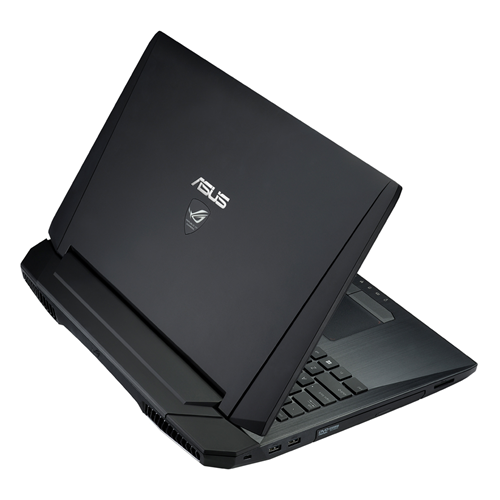
Another WMC event, and another ASUS ROG gaming laptop to impress us. ASUS' latest G750 gaming laptops retain what the previous G-series laptops excelled at, and add an improved design, the latest Intel Haswell and NVIDIA GeForce GTX 700M hardware, and run the latest Windows 8. The G750JW is the laptop we have for review today, and it sells for a reasonable starting price of $1,249.


The G750-series laptops feature somewhat aggressive,intimidating design, which has been part of the Republic of Gamers brand's identity. Inspired on a stealth fighter and with a jet black paintjob, the G750s have "gaming" written all over them. The outside of the lid is very rubbery, but unfortunately it can be a fingerprint magnet at times. On the center is a large ASUS logo, and beneath it is the Republic of Gamers branding, which illuminates when the display is on (in a similar way to the MacBooks' illuminating Apple logo).


The back of the laptop houses two large air vents for the laptop's elaborate cooling system. This ensures that you don't hear the coolers as much (they're very silent anyways) and you won't have hot air blowing into your hands while using a mouse. 


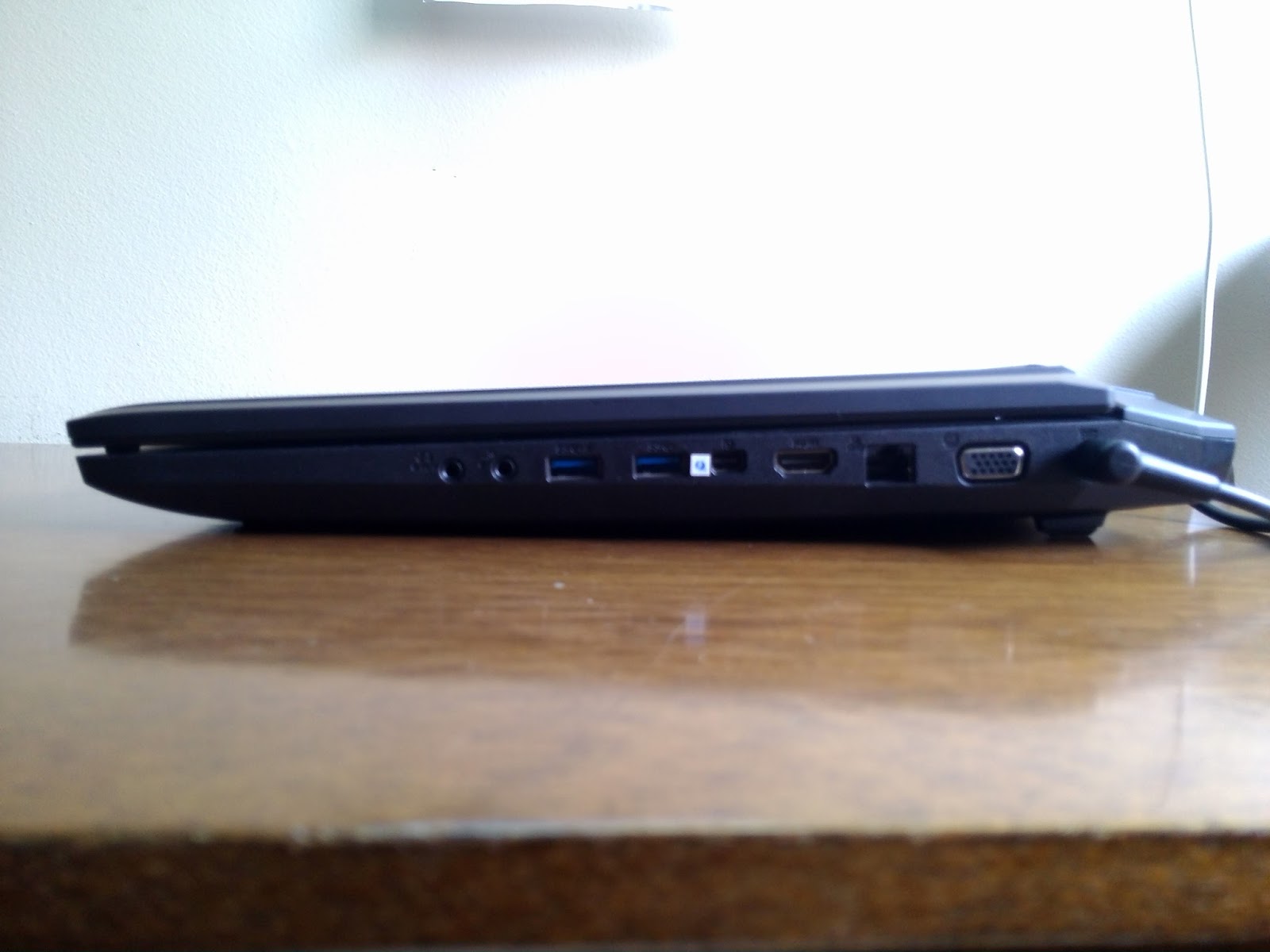
The left side houses a Kensington Lock, two USB 3.0 ports, a DVD burner and a SD card slot (from left to right).


The right side contains the charging port, as well as VGA, Ethernet, HDMI and Thunderbolt port, as well as two more USB 3.0 ports and a 3.5mm microphone jack and headphone jack. 
With all these ports, you'll never be disappointed by the laptop's connectivity options. 


Open the laptop, and you have, fitted in a black-colored, brushed alumunium chassis, a backlit, chiclet-style keyboard, and beneath that there's a large touchpad with very tactile left and right buttons. The aluminium chassis is very pleasing to touch, and makes typing comfortable, and ensures the palm rests don't heat up at all, even during intense gaming.


The keyboard itself feels very solid, and typing on it is very easy. The large screen size also allows for a numeric keypad to be included. Also, the backlighting of the keyboard makes typing in the dark an easy task.


The G750's display is, to put it simply, beautiful. It has a LOT of screen size for a laptop, measuring 17.3 inches diagonally. The 1920 x 1080 Full HD LED Matte screen makes for crisp text and clear images, as well as very rich colors, and also reduces bothersome glare. However, some grain is visible when viewing text on a white background, but that's an easily forgettable issue. Especially when watching videos or playing games, the G750's display is astounding due to its deep colors, high contrast, high resolution, and large size. 

Well, this is a gaming laptop, so evidently the most interesting part of it is its performance. And ASUS does not disappoint. All of the G750 laptops are equipped with Intel's latest Haswell Core-i7 CPU and a high-end GeForce GTX 700M series GPU. In the case of the G750JW, we're looking at a Core i7-4700HQ CPU (4 cores/8 threads @ 2.4GHz, up to 3.4GHz with Turbo Boost) and a GeForce GTX 765M GPU.

The choice of the 765M is very interesting, because it almost exactly matches the Xbox One's GPU in terms of clock speed and core count. The 765M is based on the very efficient Kepler architecture, and contains 768 shader cores, 64 TMUs (Texture Mapping Units) and 16 ROPs (Render Output Units). The default clock speed is 797 MHz, but the thermal-based GPU Boost 2.0 can ramp it up to 901MHz. Basically, the GPU clock will be boosted to 901MHz when needed until it heats up to a certain thermal limit, and then the clock returns to 797MHz. Thanks to the G750JW's very good thermal design, though, I didn't once see the clock drop below 901MHz in my testing, and I can assure that the 901MHz clock can be kept for at least one hour of looped benchmarking, but it can probably go for way longer. This GPU has 2 GB of 128-bit wide GDDR5 memory @ 2GHz nominal clock (4GHz effective), resulting in peak memory bandwidth of 64 GB/s. At the default clock speed, the GPU can achieve 1.22 TFLOPS performance, and with the GPU Boost 2.0, the compute power goes up to 1.38 TFLOPS. Like I said, though, the GPU Boost can be kept for an indefinitely long time, so you'll be enjoying the 1.38 TFLOPS figure mostly.

These numbers stack up pretty well against the Xbox One's GPU. In comparison, it has the same core count (albeit with 16 less TMUs than the 765M, as in 64 vs 48 TMUs), with a clock speed (853 MHz) that gives the GPU 1.31 TFLOPS. So as long as the 901MHz clock can be kept constantly on the 765M, you'll even have a bit more compute than the Xbox One, and without the GPU Boost clock you'll still get pretty close to it. The only place where the 765M has a potential disadvantage is its limited memory bandwidth. Against the 256-bit wide DDR3-2133 memory of the Xbox One (68.2 GB/s), the difference is negligible, but taking into account the huge bandwidth optimizations the on-die 32MB eSRAM gives the Xbox One, the 765M is left behind by a big margin. Of course, you can easily overclock the 765M's memory to give up to 76.8 GB/s bandwidth (due to the GPU Boost 2.0 not being visible to the software, I couldn't overclock the GPU cores, just the memory).

The limited memory bandwidth is the 765M's biggest potential bottleneck, though in my testing I didn't see the memory controller hitting its limit without the GPU load being at 99% too, so the memory bandwidth seems to be on par with the compute power available. However, I highly recommend you overclock the memory. It can safely be overclocked to 2.4GHz, which gives 76.8 GB/s of bandwidth, and is quite a leap from 64 GB/s. I will run a few benchmarks and then update this post soon. 

So basically, the 765M is a very safe choice, because it means that, theoretically speaking, you'll be able to run any game as well as an Xbox One would, unless perhaps if it's too heavy on the memory bandwidth. I tested Resident Evil 6 and Assassin's Creed III on it, and, while Resident Evil 6 ran virtually flawlessly at 1080p, with max settings and the highest Anti-Aliasing option, Assassin's Creed III, at 1080p, would require me to lower Anti-Aliasing and Shadow quality, and would run pretty smoothly (but still, it could relatively smoothly, read: slightly non-smoothly, render large forests even with Environment quality set to max). So 1080p gaming is perfectly possible, but you may have to reduce a couple of settings to get mostly smooth framerates, and with a 765M, you'll at least have the comfort of knowing that you're on par with a current gaming console. 

Our review unit came only with a 5400 rpm 1TB hard drive, since it is the entry-level $1,249 G750JW, and the lack of an SSD hits the general speed of the computer significantly, particularly when booting the PC. Not that the hard drive is painfully slow, but it's still by far the weakest component of the whole setup. This unit also came with 8 GB of RAM, which is definitely enough for the most demanding games, but may not be enough in a few years. ASUS makes this easy to remedy, though, as the two hard drive slots and two of the four RAM slots are easily accessible through a lid at the back of the laptop, so you can just pop in an SSD or some extra RAM quite easily. If you have the money, I'd really recommend putting in the SSD, because with that addition, the computer will be simply blazing fast (not that it's not already like that for most uses). 


You can see how the lack of an SSD bogs down the laptop here. While CPU, RAM, and GPU benchmark scores all resonate relatively uniformly inside the 7.0-8.0 range, the hard drive is way off, with a score of only 5.9. However, this will only be a problem in situations that use a lot of I/O, so gaming performance will not be affected, it will make loading times longer. 

Well, so how good is the G750JW? for its price, excellent. I don't think there's an alternative in the market (except perhaps Toshiba's Qosmio X75, but that laptop compromises with a not-so-good design) that can offer so much quality and performance for that price. Basically, it's like the top-end G750JH, but with a watered-down GPU, no SSD and less RAM. Hence, I highly recommend the G750JW for anyone who is looking for a gaming laptop that performs very well, but can't afford the top-end beasts. And if you have the money, the higher-end G750JX/JH models are what I consider to be the best gaming laptops around.

quinta-feira, 15 de agosto de 2013

Possible New ASUS Transformer Pad (2013) Benchmarks leak

One of the biggest sources of device leaks come from benchmark databases, and GFXBench's online database has just spilled the beans on an upcoming ASUS device running NVIDIA Tegra 4.

The unknown device's name only registers as "ASUS Eee Pad (Tegra 4, retina)". This is very odd, because the Eee Pad brand has vanished for over a year, as it was replaced by the Transformer Pad title. Now, I don't think a revival of the Eee Pad name is likely, so I assume we're dealing with a new Transformer Pad iteration here.


The leaked results point to a Eee Pad device, running Android 4.2.2, running on a 1.9GHz Tegra 4 processor and with a 2560 x 1600 display. That falls in line with the official specs of the upcoming 2013 Transformer Pad Infinity. The software build numbers (WW_epad-10.14.0.39.3) are in accordance with ASUS' usual firmware build numbers, which gives these results more authenticity. 


The device's performance is pretty much in line with what the Tegra 4 has produced so far. Analyzing the very shader intensive T-Rex HD tests, You can see that, while the Tegra 4 can't quite outperform the iPad 4, it gets extremely close to it, to an extent that the difference in framerate is negligible (granted, the iPad 4 is 10 months old now, and it still has the lead). An impressive feat is that, on the Onscreen test, the Tegra 4 can keep itself very close to the iPad 4 despite the fact that it's pushing about 1 million pixels more. The performance hit for all these pixels should be much larger, so something about the Tegra 4's architecture helps it scale performance well as resolution increases.

The Egypt HD test looks a bit worse for the Tegra 4. At normalized resolution, it can push a respectable 50 fps, but it's still about 5 fps behing the iPad 4, and in this test, the higher resolution seems to penalize the GPU more, as the gap increases to a 13 fps difference between the two. It can still push 30 fps though, which proves the Tegra 4 is capable of playing most mobile games at native resolution while keeping a fluent framerate.

Fill test was always Apple's forte and at the same time NVIDIA's achilles' heel, and while fill rate isn't as horrendous as it was on the Tegra 3, thanks to Tegra 4's dual-channel (finally) DDR3 memory subsystem, it's still significantly behind the iPad 4, and even the Nexus 10. 1130 MTexels/s is a decent score, but falls begin the iPad 4's 2089 MTexels/s capability. This could be especially a problem at this extremely high resolution. While Tegra 4's memory bandwidth should be enough for most games, even with its resolution, a few games could suffer slight performance hits due to limited memory bandwidth, but I think that's only to occur later in the future. 

Triangle throughput isn't bad in the Tegra 4, as it can keep up with the Mali-T604 in the Nexus 10 and the Adreno 320, but, again, this is another speciality of PowerVR GPUs, as the iPad 4 and its PowerVR SGX 554MP4 trumps anything Android-based in terms of triangle throughput. But still, there shouldn't be any bottlenecks caused by triangle throughput in this device. 

I would take this information with a grain of salt, as there is no way of confirming the validity of these results. However, the fact that the results seem to fall in line with other Tegra 4 devices, and the specs reported are in accordance with ASUS' upcoming Transformer Pad Infinity tablet (more info here), and the firmware naming scheme seems pretty real, add up to make a big chance of this being a real device, probably the new Infinity. The 10-incher Android tablet is expected to launch in this quarter, so these results might indicate it will launch very soon.

terça-feira, 30 de julho de 2013

Google Nexus 7 (2013) Review: Aggressively Specced, Aggressively Priced

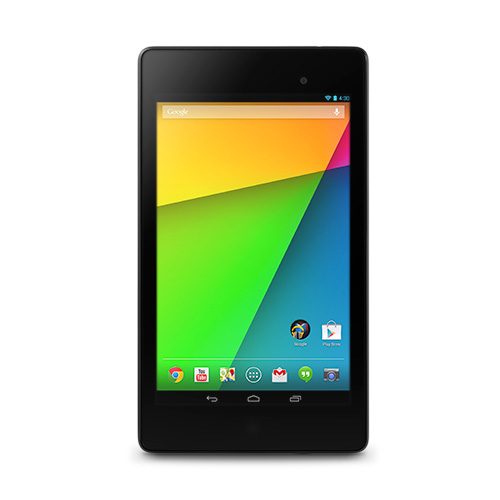
When Google announced its first Nexus 7 tablet, built by ASUS, back in mid-2012, it was clearly destined to make the budget tablet market skyrocket. For a very low $199 price tag, the Nexus 7 offered excellent performance, good built quality, and virtually immediate Android updates. It was a cost-performance paradise, so unsurprisingly it quickly became extremely popular. Now, one year later, when the OG Nexus 7 is growing long in the teeth, Google and ASUS took cost-performance to a whole new level again with the new Nexus 7.

The refreshed 7-incher offers one of the fastest processors and a 1080p display, while keeping a very slim profile and record-breaking weight, all for just $30 more. Of course, competitors are in a catch-up state, but for now, the new Nexus 7 is clearly and by far the best budget tablet, and is also certainly the best cost-performance tablet ever made. 

(2013) Google Nexus 7 Apple iPad mini ASUS MeMO Pad 7 HD
Body 200 x 114 x 8.65 mm, 290g (299g with LTE) 200 x 134.7 x 7.2mm, 308g (312g with LTE) 196.8 x 120.6 x 10.8mm, 302g
Display 7" 1920 x 1200 (323ppi) LED-Backlit IPS w/ Corning Gorilla Glass 7.9" 1024 x 768 (163ppi) LED-Backlit IPS 7" 1280 x 800 (216ppi) LED-Backlit IPS
Storage 16/32 GB, 2 GB RAM 16/32/64 GB, 512 MB RAM 8/16 GB, 1 GB RAM
Connectivity Wi-Fi only version and Wi-Fi + GSM (2G) + HSDPA (3G) + LTE (4G) version Wi-Fi only version and Wi-Fi + GSM (2G) + HSDPA (3G) + LTE (4G) version Wi-Fi only
Camera (rear) 5 MP w/ autofocus, face detection, 1080p video 5 MP iSight camera w/ face detection and autofocus, 1080p video 5 MP w/ autofocus
Camera (front) 1.2 MP 1.2 MP with 720p video 1.2 MP
OS Android 4.3 iOS 7 Android 4.2.2
Chipset Qualcomm Snapdragon S4 Pro (28nm): Quad-core Krait @ 1.5 GHz + Adreno 320 GPU Apple A5 (32nm HKMG): Dual-core Cortex-A9 @ 1.0GHz + PowerVR SGX 543MP2 GPU MTK 8125: Quad-core ARM Cortex-A7 @ 1.2GHz + Mali-400 GPU
Battery Li-Polymer 3950 mAh (15Wh), up to 9 hours usage Li-Polymer 16.3Wh, up to 10 hours usage Li-Polymer 15Wh, up to 10 hours usage
Price $229 for Wi-Fi 16 GB version $329 for Wi-Fi 16 GB version $129 for 8 GB version and $149 for 16 GB version

Design

The new Nexus 7 isn't radically different from the old iteration, but the differences are notable and much appreciated. The back design gets a makeover, since it changes the textured rubbery back of the OG Nexus 7 for a plain, still a bit rubbery plastic, resembling the Nexus 10's feel, which makes the back look cleaner. Strangely, Google didn't make it clear whether they wanted the new Nexus 7 to be used more in landscape or in portrait mode. The vast majority of smaller tablets, including the 2012 Nexus 7, are tailored for use in portrait mode, but the new Nexus 7 gives some indication of wanting to be used in landscape. For instance, the Nexus logo on the back is oriented in landscape (but the smaller ASUS logo beneath it is in portrait.....hmmm weird), and the stereo speakers are both positioned on the tablet's top and bottom sides (when in portrait).

Apart from that, the back contains the 5 MP shooter at the top left corner. Aside from that orientation shortcoming, the back of the new Nexus 7 does look significantly more premium than its older counterpart.

The front of the device is very similar to the OG Nexus 7, with the exception the the vertical bezels are slightly thinner, and there is now a notification LED below the display. The tablet's dimensions are impressive for a device with its price, and indeed, the new Nexus 7 does feel much thinner and lighter than its older version. The thickness comes in at 8.7mm; not as thin as the iPad mini (7.2mm), but still a significant improvement over the OG Nexus 7's 10.4mm girth. Impressively, the new Nexus 7 sets the record as the lightest tablet ever, weighing just 290g (299g for the LTE version), it's lighter than the iPad mini (308g, 312g with LTE) and much lighter than its predecessor (340g, 347g with 3G). Especially for its price, the new Nexus 7 is one very svelte device. 

Display

People have been wondering how long it would take for Apple to release a Retina iPad mini. Well, Google beat them to it. The new Nexus 7's display has a pixel density that sits squarely in the Retina range, and is actually the tablet with the highest ppi ever. 1920 x 1200 pixels in that 7" IPS display results in an extremely crisp 323ppi pixel density. It blows the iPad mini's mediocre 163ppi and the OG Nexus 7's 216ppi out of the water, displaying razor sharp text and bright, crisp images. The LED-Backlit IPS technology also means that the new Nexus 7 will have excellent viewing angles and vivid color reproduction. There's no question about it; the new Nexus 7 has by far the best display in the 7/8-inch tablet market, and quite possibly the best display in the entire tablet space.

Performance

Guess what? Google also gave performance a huge upgrade with the new Nexus 7. The refreshed 7-incher doesn't have a particularly new SoC, but it's definitely one of the fastest. The SoC in question is Qualcomm's Snapdragon S4 Pro SoC, which consists of a very fast Quad-core Krait CPU clocked at 1.5GHz and a very juicy Adreno 320 GPU. With that kind of performance, the new Nexus 7 will definitely be one of the fastest tablets in existence, and will be quite the gaming machine, especially with the crisp, bright display. 

Pricing and Conclusion

I may be wrong, but from my point of view, there is absolutely nothing to complain about the new Nexus 7. As it's a Nexus device, it will be the first to receive Android OS updates for many years to come. It offers an improved build quality with better looks, it's much lighter and thinner, placing itself as the lightest tablet ever. It has an outstanding display, probably the best display ever seen in a tablet, and it's performance is excellent, making it a good gaming machine. I may be getting ahead of myself here, but the new Nexus 7 is basically one of the, if not the, best tablet ever made. And to make it almost perfect, it's also very budget friendly. It's a bit more expensive than the OG Nexus 7, but it's still significantly cheaper than the much more lackluster iPad mini. Starting at $229 for the Wi-Fi only version with 16 GB (pricing for the LTE version is still unknown), the Nexus 7 is the bargain of the century. Well done, ASUS and Google!

domingo, 16 de junho de 2013

ASUS MeMO Pad 10 FHD and 7 HD: Premium Budget Tablets

Amidst many announcements ASUS made during Computex 2013, most of which were high end, premium devices, a few budget conscious devices were announced as well. ASUS (thankfully) addressed the fact that their low-end tablet range, the MeMO Pads, were far too low-end to make their low price tag worth it. In fact, the new members of the MeMO Pad line, the MeMO Pad 7 HD and the 10 FHD, offer a lot of bang for the buck, keeping the same price as their predecessors ($149 for the 7 HD and $299 for the 10 FHD).

MeMO Pad 7 HD


Definitely an excellent refresh to the original lack-luster MeMO Pad, this new version of the 7-inch tablet discards the Nexus 7-originated rubbery texture in favor of a glossy plastic. Like the previous MeMO Pad, this tablet comes in multiple color options, like a white, pink, yellow and blue version. Apart from that change in the back casing, there doesn't appear to be much change in the design. The ASUS logo below the screen remains, but the bezels (both horizontal and vertical) appear slightly smaller. The display is the same 7" IPS unit from the last MeMO Pad, but it receives a significant bump from 1024 x 600 to a 1280 x 800 resolution, equaling the Nexus 7 with 218ppi. The SoC in the MeMO Pad 7 HD may not be as good as the Nexus 7's Tegra 3, though. A MediaTek SoC with a 1.2GHz quad-core Cortex-A9 CPU and a PowerVR SGX544 GPU powers the 7 HD, with 1GB of RAM memory. While the CPU should be competitive enough (better than the iPad mini's at least), I can't ascertain how good the GPU is (the 544 can have more than one core, and the clock speed is also unknown), but if we assume that it is a single SGX 544 core running at its max clock speed (533MHz), then we can expect performance on par with an iPad 2 (also the iPad mini), so it should be competitive enough. The 7 HD should also be slightly lighter than the iPad mini,weighing 302g, however still considerably thicker (10.8mm). Unlike the Nexus 7, the MeMO Pad has dual cameras: a 5MP piece on the rear, capable of 720p video, and a 1.2MP shooter on the front.

The MeMO Pad 7 HD is expected to launch roughly around July, and will be available in 8 and 16 GB versions. This tablet's greatest advantage over the Nexus 7 is that the 8 GB version ships for just $139, establishing itself and one of the first sub-$150 tablets that is actually decent, spec-wise.

MeMO Pad 10 FHD


ASUS made a pretty decent budget 10" tablet with the original MeMO Pad 10 Smart. It offered a light tablet, a decent display and SoC, all for just $299. In fact, I think this is the cheapest 10-incher around. Now that ASUS is refreshing this tablet with a much better spec-sheet, they managed to make a very good, yet very cheap 10" tablet. Design-wise, the new MeMO Pad 10 doesn't change much. The back has the same layout: dual speakers located on either end of the device (in landscape), an ASUS logo in the center and a camera on the top-center of the device. The back is made of plastic, and will be available in multiple color options (blue, pink and white). The tablet weighs 580g and has practically the same thickness (9.5mm) as the iPad 4. What is impressive about the MeMO Pad 10 FHD, especially for the price, is that, as its name suggests, its display will have Full HD resolution (1920 x 1200). As usual, this tablet's display is an IPS unit, which means great viewing angles. The rear camera is a 5MP unit capable of shooting 1080p video, while the front-facing camera is 1.2MP. This is a very interesting tablet, because it is one of the few Android tablets that have an Intel Atom processor. This tablet, in fact, comes with a Clover Trail+ SoC, hence it should be a good perfomer. This particular SoC (codename Z2560) uses two Saltwell cores running at 1.6GHz (HyperThreading enabled). The GPU is a PowerVR SGX 544MP2 at up to 400MHz, so the gaming performance should be slightly less than that of the iPad 3. The memory consists of 2 GB of RAM with a memory interface of dual-channel LPDDR2-1066 (8.5GB/s), which should be enough to keep framerates smooth, unless you decide to play more complex 3D games.

The MeMO Pad 10 FHD is expected to be available as of Q3 2013, the entry-level 16 GB version being available for just $299, establishing the MeMO Pad 10 as an excellent Android tablet for a very low price.

segunda-feira, 3 de junho de 2013

New ASUS Transformer Pad Infinity Announced At Computex 2013: 1600p Display and NVIDIA Tegra 4 on board


ASUS is announcing a wide variety of mobile devices at its Computex 2013 event, - innovative and quirky alike - together with its latest flagship 10-inch tablet, a refreshed version of the Transformer Pad Infinity. While it doesn't, so far, appear to bring any big change to the Transformer Pad line, and in fact is more of a refresh, as the new Transformer Pad Infinity brings with it a very competitive high-resolution display and what must be the fastest mobile SoC yet.

The new Infinity uses the same kind of display as the last-gen Infinity, that is, a bright Super IPS+ display, however, the new Infinity receives a significant bump in terms of resolution, as it has a resolution of 2560 x 1600 (vs the 1920 x 1200 of the "old" Infinity), and a pixel density of 299ppi (vs 224ppi in the old Infinity), which beats the 264ppi of the iPad 4 and is on par with the Nexus 10's display. There's no data to back this up right now, but based on previous Transformers with the same Super IPS+ display, the display will probably have the same excellent blacks, and also unsurpassed screen brightness which characterizes the Super IPS+ display, which results in very good contrast from these displays. However, ASUS' tablet displays tend to reproduce rather washed out colors. We can't be sure these characteristics of ASUS tablet displays will also be present on the new Infinity, but it's definitely a possibility. Like the old Infinity, the new version will also have its display protected by Corning Gorilla Glass 2.

It's clear now how tablet cameras are really not that important, since ASUS actually downgraded the camera from the old Infinity to the new one (8MP vs 5MP), hence (almost) all modern tablets have 5MP cameras, which only shows how tablets, especially 10-inch ones, aren't adequate for taking pictures and videos.

One very interesting aspect of the new Transformer Pad Infinity is its internals. In fact, it is one of the first devices to use NVIDIA's powerful Tegra 4 System-on-Chip. Basically, it is an SoC built on power efficient 28nm process, which supports an optional Icera 3G/4G modem (hence, we may see an LTE variant of the Infinity). The SoC itself consists of four powerful Cortex A15 cores ticking at 1.9GHz, with an additional low frequency Cortex A15 core for handling light workloads with very little power consumption, with a 2 GB of RAM memory and a memory interface of 32-bit dual-channel DDR3-1899 (17.1 GB/s) and a whopping 72-core GPU. Thanks to the powerful GPU and outstanding memory bandwidth, the Infinity will fare very well with complex 3D games despite its mind blowing resolution.

Last but not least, the new Transformer Pad Infinity, much like every Transformer device preceding it, will have an optional keyboard dock that essentially turns the device into an Android Ultrabook, plus enhances connectivity and battery life. In fact, Pad + Dock combined will have a total battery capacity of 18,000 mAh; much more than the iPad 4's 11,000 (ish) mAh battery.

The Transformer Pad Infinity will be released in the coming months (no specific dates were given though), and so far is confirmed to ship with 32 GB of storage (a 64 GB version is likely to be released too). Pricing is still unknown but the 32 GB version will probably cost $499, corresponding to the last gen Infinity and competitive with other tablets. On paper, the ASUS Transformer Pad Infinity looks like it will place itself ahead of the current top tablets (specifically, the iPad 4 and the Google Nexus 10), or will at least be on par with them, in terms of display, design, performance, etc.