Mostrando postagens com marcador intel. Mostrar todas as postagens

domingo, 1 de fevereiro de 2015

CES 2015: Asus unveils the Zenfone 2: $199 Flagship


A flagship smartphone starting at $199? Is that even possible? Well, Asus appears to have achieved it, according to their CES 2015 announcement of their new Zenfone 2 smartphone. Basically, the Zenfone 2 has specs that put it right on flagship territory, however, it's price tag is similar to mid-range phones. Costing as little as $199 before taxes, the Zenfone 2 might just have the most bang for the buck we've seen for a phone since the Moto G.

Asus' new smartphone has many variants at different price points, and instead of offering only variants with different storage capacities like most phones, the Zenfone 2 is available in different configurations for storage, RAM, and even processor speed. Of course, the $199 price tag applies to the simplest configuration, which is itself no slouch, with 16GB storage, 2GB of RAM and an Intel Z3560 processor (Quad-core 1.8GHz). Considering that most phones at this price range offer much less than that, Asus really must be congratulated for making such a good phone at this price range. 

Of course, it is very possible that Asus made some compromises to reach the low starting price for the Zenfone 2, and this can be confirmed only when the phone is actually available for purchase. For now, though, Asus has an astounding phone in their hands, at least on paper.

Asus Zenfone 2
 Body   152.5 x 77 x 10.9~3.9mm, 170g
 Display   5.5" IPS LCD fullHD (1920 x 1080, 403ppi)
 w/ Corning Gorilla Glass 3
 Data  LTE: Cat. 4 150/50 Mbps
 (FDD-LTE: Bands 1/2/3/4/5/7/8/9/17/18/19/20/28/29
 TDD-LTE: Bands 38/39/40/41)
 HSDPA
 GSM
 Connectivity   -Wireless:
 WiFi 802.11a/b/g/n/ac
 Bluetooth 4.0
 NFC
 GPS, A-GPS and GLONASS
 -Ports
 3.5mm audio jack
 microUSB 2.0 (with USB OTG)
 microSD card slot, up to 64GB
 Camera (rear)   13MP, 5-element f/2.0 lens, with dual-color LED flash. 1080p@30fps video
 Camera (front)  5MP, f/2.0 aperture lens, 85-degree wide lens
 Storage/RAM  16/32/64 GB, 2/4 GB RAM
 - Asus WebStorage: 5GB (lifetime)
 Processor  Intel Atom Z3560/Z3580 
 CPU   Quad-core Silvermont (4C/4T) 1.8GHz/2.3GHz
 GPU  PowerVR G6430 @ 533MHz (136 GFLOPS)
 OS  Android 5.0 Lollipop with Asus ZenUI
 Battery  Li-Ion 3,000 mAh, non-removable


Design


The Zenfone 2 is undeniably a beautiful phone. There are many notable details about the Zenfone 2's design, the sum of which might just make Asus' new design the best one we'll see in a while. Most notably, Asus decided to, like LG, ditch the traditional side-mounted volume keys to the back of the device, aiming a reduction in bezel width. Unlike LG's approach, though, which moves the power button to the back as well as the volume keys, Asus chose to move only the volume keys to the back, putting the power button on the top of the phone. Speaking of bezel width, Asus' new phone has exremely slim bezels, which make the phone that bit more attractive, with a relatively good screen to body ratio of 72%.

Other notable features of the design include the all-aluminium rear and the Zenfone series' signature spun metal strip on the bottom of the front of the phone. The rear of the device is entirely made of brushed metal, in a rather HTC One-like fashion, which makes for a very premium looking phone, despite the low starting price. 

ZenUI
ZenUI is what Asus calls their Android skin. Their newest version of ZenUI has Android 5.0 Lollipop on its core, the latest Android version. Overall, ZenUI is one of the best Android skins available, and is the opposite of TouchWiz. While it keeps layout and functionality close to stock, adding little bloatware, it focuses rather on changing the look of Android.

ZenUI makes Android look very sleek with a flat, modern user interface, all without being intrusive to the unexperienced user. In general, this must be one of the best Android skins, if not the best. 

Display

The Zenfone 2's display is on par with current flagships, which is very good for a phone with such a low starting price. What we have in hand is a 5.5" IPS LCD with fullHD resolution. With such a screen size, the Zenfone definitely steps into phablet territory, even if the extremely slim side bezels help reduce the phone's footprint.

If anyone's disappointed that Asus used "just" a 1080p display instead of a QHD screen: don't be. Any resolution increase from 1080p on a 5.5" phone would be very hard to notice. The difference is definitely not noticeable enough to offset the extra power consumption and performance impact that comes with QHD. At this point, it's much better to keep resolution where it is and work on other aspects of the display, and Asus' choice to keep it to 1080p might even give it a performance advantage over the competition. 

Anyways, Asus' phone ends up with a 403ppi pixel density, which should be perfectly fine unless you are trying to see some really small details. The Zenfone 2 will look as sharp as any flagship phone should look.

Processor

You can actually choose between two different processors for the Zenfone 2, depending on how much you're willing to pay for the phone. Ever so faithful to Intel, Asus has again decided to ship their flagship phone with an Atom processor, in this case, either the Z3560 or the Z3580. Since both available processor options belong to the same platform (Moorefield), both processors are physically identical, and the difference between them comes down to clock speed.

Both processors are built on a 22nm process, and include a CPU consisting of four Silvermont cores with 2MB of L2 cache. Since Silvermont is a 64-bit CPU and the Zenfone 2 runs on Android 5.0, the phone will benefit of the processor's 64-bit processing capabilities.

Also, both processors use a PowerVR G6430 GPU (same as the one on the Apple A7), with a base frequency of 457MHz and a burst frequency of 533MHz. In burst mode, the G6430's GPU can deliver a peak compute power of 136 GFLOPS, which is slightly above the Snapdragon 800's Adreno 330, but much less powerful than the Snapdragon 805's Adreno 420. The GPU is the only aspect of the Zenfone 2 which is not on par with flagships, but then again, it's hardly a slouch.

The differences between the Z3560 and the Z3580 come down to their CPU clock speed. While the Z3560 has its four cores clocked at up to 1.83GHz, the Z3580 can go all the way to 2.33GHz. That's a 500MHz increase for each core, which should definitely make a difference in usage...and in battery life. 

Conclusion

A flagship phone for $199. That is a combination most people would say is impossible. However, at least in paper, Asus really didn't cut back on any features to achieve the low price. Every aspect of this phone is flagship-level, and this achievement could make the Zenfone 2 a very successful smartphone. 

You get everything that you can possibly ask for from a flagship - A beautiful design, the latest Android version, good cameras (although 4K recording would have been appreciated), a large, high-quality, high-resolution display; a good processor too (even if not exactly among the best). All for a very low starting price. Even if the $199 version of the phone has "only" 2GB of RAM and a lower-clocked CPU, you're still getting much more than any other phone on this price range.

In general, Asus has done very well with its latest flagship. It has the specs of a flagship and the price of a mid-ranger. How that achievement will translate to sales figures is yet to be seen, but if Asus gets availability and marketing right, it's Zenfone 2 could be a huge success. 

sábado, 24 de agosto de 2013

ASUS ROG G750JW Review: Excellent Specs and Beautiful Design at a Reasonable Price


Another WMC event, and another ASUS ROG gaming laptop to impress us. ASUS' latest G750 gaming laptops retain what the previous G-series laptops excelled at, and add an improved design, the latest Intel Haswell and NVIDIA GeForce GTX 700M hardware, and run the latest Windows 8. The G750JW is the laptop we have for review today, and it sells for a reasonable starting price of $1,249.


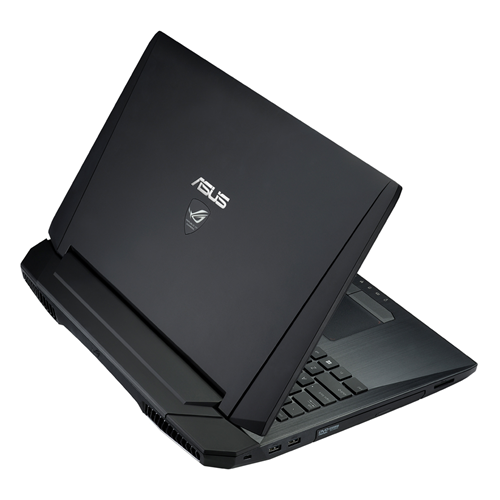
The G750-series laptops feature somewhat aggressive,intimidating design, which has been part of the Republic of Gamers brand's identity. Inspired on a stealth fighter and with a jet black paintjob, the G750s have "gaming" written all over them. The outside of the lid is very rubbery, but unfortunately it can be a fingerprint magnet at times. On the center is a large ASUS logo, and beneath it is the Republic of Gamers branding, which illuminates when the display is on (in a similar way to the MacBooks' illuminating Apple logo).


The back of the laptop houses two large air vents for the laptop's elaborate cooling system. This ensures that you don't hear the coolers as much (they're very silent anyways) and you won't have hot air blowing into your hands while using a mouse. 


The left side houses a Kensington Lock, two USB 3.0 ports, a DVD burner and a SD card slot (from left to right).


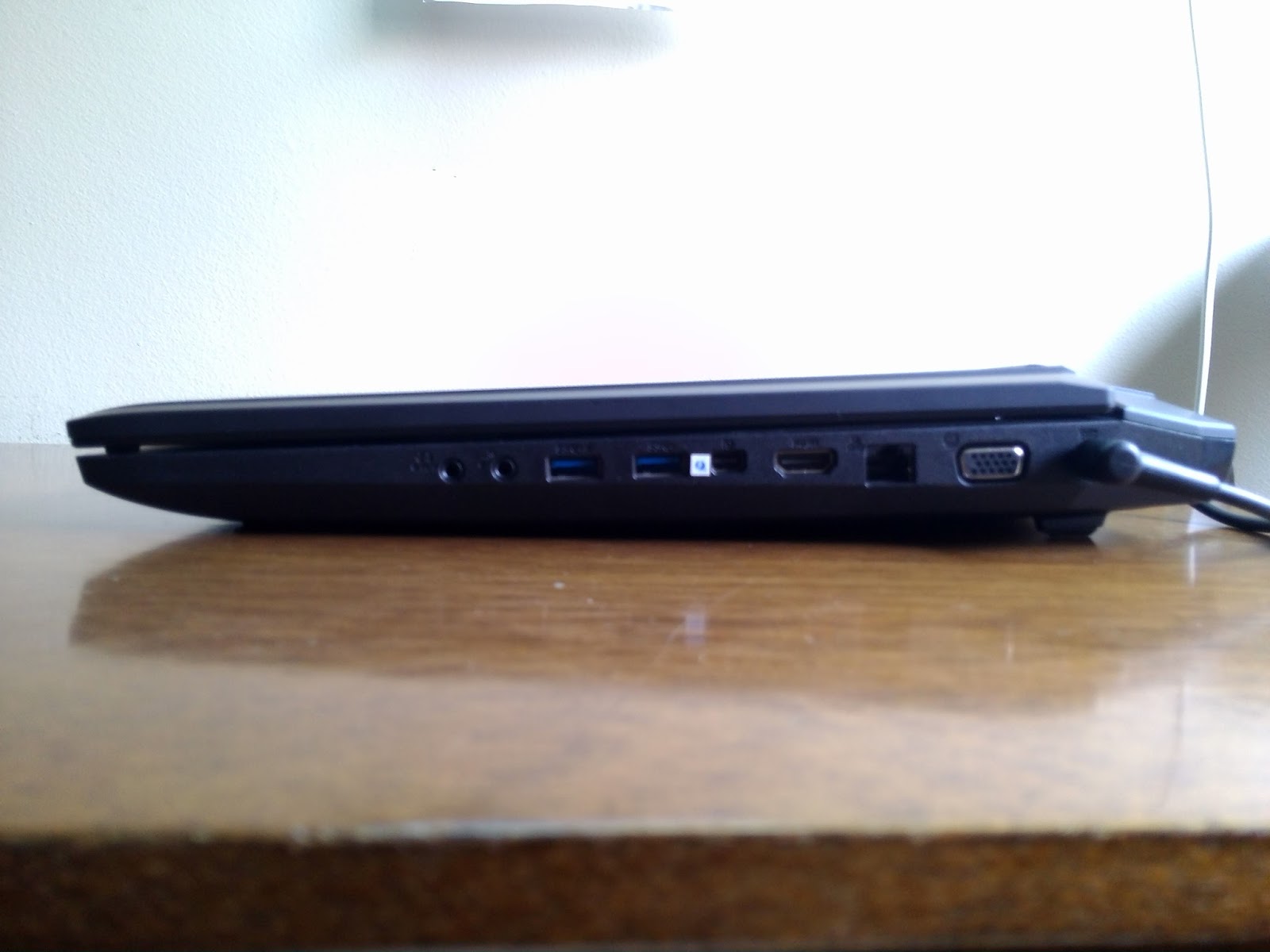
The right side contains the charging port, as well as VGA, Ethernet, HDMI and Thunderbolt port, as well as two more USB 3.0 ports and a 3.5mm microphone jack and headphone jack. 
With all these ports, you'll never be disappointed by the laptop's connectivity options. 


Open the laptop, and you have, fitted in a black-colored, brushed alumunium chassis, a backlit, chiclet-style keyboard, and beneath that there's a large touchpad with very tactile left and right buttons. The aluminium chassis is very pleasing to touch, and makes typing comfortable, and ensures the palm rests don't heat up at all, even during intense gaming.


The keyboard itself feels very solid, and typing on it is very easy. The large screen size also allows for a numeric keypad to be included. Also, the backlighting of the keyboard makes typing in the dark an easy task.


The G750's display is, to put it simply, beautiful. It has a LOT of screen size for a laptop, measuring 17.3 inches diagonally. The 1920 x 1080 Full HD LED Matte screen makes for crisp text and clear images, as well as very rich colors, and also reduces bothersome glare. However, some grain is visible when viewing text on a white background, but that's an easily forgettable issue. Especially when watching videos or playing games, the G750's display is astounding due to its deep colors, high contrast, high resolution, and large size. 

Well, this is a gaming laptop, so evidently the most interesting part of it is its performance. And ASUS does not disappoint. All of the G750 laptops are equipped with Intel's latest Haswell Core-i7 CPU and a high-end GeForce GTX 700M series GPU. In the case of the G750JW, we're looking at a Core i7-4700HQ CPU (4 cores/8 threads @ 2.4GHz, up to 3.4GHz with Turbo Boost) and a GeForce GTX 765M GPU.

The choice of the 765M is very interesting, because it almost exactly matches the Xbox One's GPU in terms of clock speed and core count. The 765M is based on the very efficient Kepler architecture, and contains 768 shader cores, 64 TMUs (Texture Mapping Units) and 16 ROPs (Render Output Units). The default clock speed is 797 MHz, but the thermal-based GPU Boost 2.0 can ramp it up to 901MHz. Basically, the GPU clock will be boosted to 901MHz when needed until it heats up to a certain thermal limit, and then the clock returns to 797MHz. Thanks to the G750JW's very good thermal design, though, I didn't once see the clock drop below 901MHz in my testing, and I can assure that the 901MHz clock can be kept for at least one hour of looped benchmarking, but it can probably go for way longer. This GPU has 2 GB of 128-bit wide GDDR5 memory @ 2GHz nominal clock (4GHz effective), resulting in peak memory bandwidth of 64 GB/s. At the default clock speed, the GPU can achieve 1.22 TFLOPS performance, and with the GPU Boost 2.0, the compute power goes up to 1.38 TFLOPS. Like I said, though, the GPU Boost can be kept for an indefinitely long time, so you'll be enjoying the 1.38 TFLOPS figure mostly.

These numbers stack up pretty well against the Xbox One's GPU. In comparison, it has the same core count (albeit with 16 less TMUs than the 765M, as in 64 vs 48 TMUs), with a clock speed (853 MHz) that gives the GPU 1.31 TFLOPS. So as long as the 901MHz clock can be kept constantly on the 765M, you'll even have a bit more compute than the Xbox One, and without the GPU Boost clock you'll still get pretty close to it. The only place where the 765M has a potential disadvantage is its limited memory bandwidth. Against the 256-bit wide DDR3-2133 memory of the Xbox One (68.2 GB/s), the difference is negligible, but taking into account the huge bandwidth optimizations the on-die 32MB eSRAM gives the Xbox One, the 765M is left behind by a big margin. Of course, you can easily overclock the 765M's memory to give up to 76.8 GB/s bandwidth (due to the GPU Boost 2.0 not being visible to the software, I couldn't overclock the GPU cores, just the memory).

The limited memory bandwidth is the 765M's biggest potential bottleneck, though in my testing I didn't see the memory controller hitting its limit without the GPU load being at 99% too, so the memory bandwidth seems to be on par with the compute power available. However, I highly recommend you overclock the memory. It can safely be overclocked to 2.4GHz, which gives 76.8 GB/s of bandwidth, and is quite a leap from 64 GB/s. I will run a few benchmarks and then update this post soon. 

So basically, the 765M is a very safe choice, because it means that, theoretically speaking, you'll be able to run any game as well as an Xbox One would, unless perhaps if it's too heavy on the memory bandwidth. I tested Resident Evil 6 and Assassin's Creed III on it, and, while Resident Evil 6 ran virtually flawlessly at 1080p, with max settings and the highest Anti-Aliasing option, Assassin's Creed III, at 1080p, would require me to lower Anti-Aliasing and Shadow quality, and would run pretty smoothly (but still, it could relatively smoothly, read: slightly non-smoothly, render large forests even with Environment quality set to max). So 1080p gaming is perfectly possible, but you may have to reduce a couple of settings to get mostly smooth framerates, and with a 765M, you'll at least have the comfort of knowing that you're on par with a current gaming console. 

Our review unit came only with a 5400 rpm 1TB hard drive, since it is the entry-level $1,249 G750JW, and the lack of an SSD hits the general speed of the computer significantly, particularly when booting the PC. Not that the hard drive is painfully slow, but it's still by far the weakest component of the whole setup. This unit also came with 8 GB of RAM, which is definitely enough for the most demanding games, but may not be enough in a few years. ASUS makes this easy to remedy, though, as the two hard drive slots and two of the four RAM slots are easily accessible through a lid at the back of the laptop, so you can just pop in an SSD or some extra RAM quite easily. If you have the money, I'd really recommend putting in the SSD, because with that addition, the computer will be simply blazing fast (not that it's not already like that for most uses). 


You can see how the lack of an SSD bogs down the laptop here. While CPU, RAM, and GPU benchmark scores all resonate relatively uniformly inside the 7.0-8.0 range, the hard drive is way off, with a score of only 5.9. However, this will only be a problem in situations that use a lot of I/O, so gaming performance will not be affected, it will make loading times longer. 

Well, so how good is the G750JW? for its price, excellent. I don't think there's an alternative in the market (except perhaps Toshiba's Qosmio X75, but that laptop compromises with a not-so-good design) that can offer so much quality and performance for that price. Basically, it's like the top-end G750JH, but with a watered-down GPU, no SSD and less RAM. Hence, I highly recommend the G750JW for anyone who is looking for a gaming laptop that performs very well, but can't afford the top-end beasts. And if you have the money, the higher-end G750JX/JH models are what I consider to be the best gaming laptops around.