terça-feira, 30 de julho de 2013

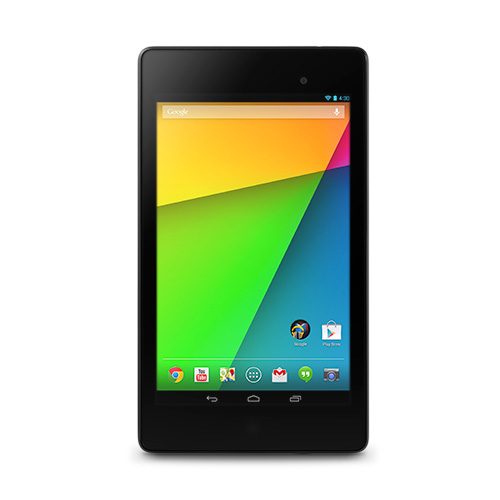
Google Nexus 7 (2013) Review: Aggressively Specced, Aggressively Priced

When Google announced its first Nexus 7 tablet, built by ASUS, back in mid-2012, it was clearly destined to make the budget tablet market skyrocket. For a very low $199 price tag, the Nexus 7 offered excellent performance, good built quality, and virtually immediate Android updates. It was a cost-performance paradise, so unsurprisingly it quickly became extremely popular. Now, one year later, when the OG Nexus 7 is growing long in the teeth, Google and ASUS took cost-performance to a whole new level again with the new Nexus 7.

The refreshed 7-incher offers one of the fastest processors and a 1080p display, while keeping a very slim profile and record-breaking weight, all for just $30 more. Of course, competitors are in a catch-up state, but for now, the new Nexus 7 is clearly and by far the best budget tablet, and is also certainly the best cost-performance tablet ever made. 

(2013) Google Nexus 7 Apple iPad mini ASUS MeMO Pad 7 HD
Body 200 x 114 x 8.65 mm, 290g (299g with LTE) 200 x 134.7 x 7.2mm, 308g (312g with LTE) 196.8 x 120.6 x 10.8mm, 302g
Display 7" 1920 x 1200 (323ppi) LED-Backlit IPS w/ Corning Gorilla Glass 7.9" 1024 x 768 (163ppi) LED-Backlit IPS 7" 1280 x 800 (216ppi) LED-Backlit IPS
Storage 16/32 GB, 2 GB RAM 16/32/64 GB, 512 MB RAM 8/16 GB, 1 GB RAM
Connectivity Wi-Fi only version and Wi-Fi + GSM (2G) + HSDPA (3G) + LTE (4G) version Wi-Fi only version and Wi-Fi + GSM (2G) + HSDPA (3G) + LTE (4G) version Wi-Fi only
Camera (rear) 5 MP w/ autofocus, face detection, 1080p video 5 MP iSight camera w/ face detection and autofocus, 1080p video 5 MP w/ autofocus
Camera (front) 1.2 MP 1.2 MP with 720p video 1.2 MP
OS Android 4.3 iOS 7 Android 4.2.2
Chipset Qualcomm Snapdragon S4 Pro (28nm): Quad-core Krait @ 1.5 GHz + Adreno 320 GPU Apple A5 (32nm HKMG): Dual-core Cortex-A9 @ 1.0GHz + PowerVR SGX 543MP2 GPU MTK 8125: Quad-core ARM Cortex-A7 @ 1.2GHz + Mali-400 GPU
Battery Li-Polymer 3950 mAh (15Wh), up to 9 hours usage Li-Polymer 16.3Wh, up to 10 hours usage Li-Polymer 15Wh, up to 10 hours usage
Price $229 for Wi-Fi 16 GB version $329 for Wi-Fi 16 GB version $129 for 8 GB version and $149 for 16 GB version

Design

The new Nexus 7 isn't radically different from the old iteration, but the differences are notable and much appreciated. The back design gets a makeover, since it changes the textured rubbery back of the OG Nexus 7 for a plain, still a bit rubbery plastic, resembling the Nexus 10's feel, which makes the back look cleaner. Strangely, Google didn't make it clear whether they wanted the new Nexus 7 to be used more in landscape or in portrait mode. The vast majority of smaller tablets, including the 2012 Nexus 7, are tailored for use in portrait mode, but the new Nexus 7 gives some indication of wanting to be used in landscape. For instance, the Nexus logo on the back is oriented in landscape (but the smaller ASUS logo beneath it is in portrait.....hmmm weird), and the stereo speakers are both positioned on the tablet's top and bottom sides (when in portrait).

Apart from that, the back contains the 5 MP shooter at the top left corner. Aside from that orientation shortcoming, the back of the new Nexus 7 does look significantly more premium than its older counterpart.

The front of the device is very similar to the OG Nexus 7, with the exception the the vertical bezels are slightly thinner, and there is now a notification LED below the display. The tablet's dimensions are impressive for a device with its price, and indeed, the new Nexus 7 does feel much thinner and lighter than its older version. The thickness comes in at 8.7mm; not as thin as the iPad mini (7.2mm), but still a significant improvement over the OG Nexus 7's 10.4mm girth. Impressively, the new Nexus 7 sets the record as the lightest tablet ever, weighing just 290g (299g for the LTE version), it's lighter than the iPad mini (308g, 312g with LTE) and much lighter than its predecessor (340g, 347g with 3G). Especially for its price, the new Nexus 7 is one very svelte device. 

Display

People have been wondering how long it would take for Apple to release a Retina iPad mini. Well, Google beat them to it. The new Nexus 7's display has a pixel density that sits squarely in the Retina range, and is actually the tablet with the highest ppi ever. 1920 x 1200 pixels in that 7" IPS display results in an extremely crisp 323ppi pixel density. It blows the iPad mini's mediocre 163ppi and the OG Nexus 7's 216ppi out of the water, displaying razor sharp text and bright, crisp images. The LED-Backlit IPS technology also means that the new Nexus 7 will have excellent viewing angles and vivid color reproduction. There's no question about it; the new Nexus 7 has by far the best display in the 7/8-inch tablet market, and quite possibly the best display in the entire tablet space.

Performance

Guess what? Google also gave performance a huge upgrade with the new Nexus 7. The refreshed 7-incher doesn't have a particularly new SoC, but it's definitely one of the fastest. The SoC in question is Qualcomm's Snapdragon S4 Pro SoC, which consists of a very fast Quad-core Krait CPU clocked at 1.5GHz and a very juicy Adreno 320 GPU. With that kind of performance, the new Nexus 7 will definitely be one of the fastest tablets in existence, and will be quite the gaming machine, especially with the crisp, bright display. 

Pricing and Conclusion

I may be wrong, but from my point of view, there is absolutely nothing to complain about the new Nexus 7. As it's a Nexus device, it will be the first to receive Android OS updates for many years to come. It offers an improved build quality with better looks, it's much lighter and thinner, placing itself as the lightest tablet ever. It has an outstanding display, probably the best display ever seen in a tablet, and it's performance is excellent, making it a good gaming machine. I may be getting ahead of myself here, but the new Nexus 7 is basically one of the, if not the, best tablet ever made. And to make it almost perfect, it's also very budget friendly. It's a bit more expensive than the OG Nexus 7, but it's still significantly cheaper than the much more lackluster iPad mini. Starting at $229 for the Wi-Fi only version with 16 GB (pricing for the LTE version is still unknown), the Nexus 7 is the bargain of the century. Well done, ASUS and Google!

sábado, 20 de julho de 2013

Acer Iconia W3 Review: 8.1-inch Windows 8 tablet


Ever since the OG Kindle Fire, smaller 7/8-inch tablets have been growing at a very fast pace. Today, Google's Nexus 7 and Apple's iPad mini even threaten to outsell their larger counterparts. Seeing how lucrative this form factor has become, the eventual launch of a Windows-based 7/8-incher seemed inevitable. Windows RT/8 running tablets so far only employed the largest form factors in the tablet industry due to its productivity-oriented nature, ranging from 10.1" and 11.6" to an unbearable 13". Well, today we are finally being introduced to the world's first 8-inch (8.1-inch actually) Windows tablet. And it's not even Windows RT, it's full blown Windows 8 (at this point RT seems practically dead to me). Acer's Iconia W3 8.1-inch tablet puts the complete Windows experience in a very small form factor.

C'mon, it's a Windows 8 tablet, it should have a keyboard dock! Well, an 8-inch keyboard dock would be almost impossible to comfortably type on, so Acer did something very unusual, yet effective. They designed a keyboard dock for the W3, but it didn't turn the tablet into a hybrid laptop, instead it was just.... a dock you fitted the tablet into. The dock is actually larger than the tablet itself, so it looks very weird, but it's at least user-friendly.

Strange as it looks, it is the only way of designing a keyboard dock for a smaller tablet. Which, by the way, makes the Iconia W3 the only small tablet to offer a keyboard dock. 

Acer Iconia W3 Google Nexus 7 Apple iPad mini
Body 218.2 x 134.6 x 10.2 mm, 499g 198.5 x 120 x 10.5 mm, 340g 200 x 134.7 x 7.2 mm, 308g
Display 8.1" 1280 x 800 (187ppi) LED-Backlit TFT 7" 1280 x 800 (216ppi) LED-Backlit IPS 7.9" 1024 x 768 (163ppi) LED-Backlit IPS
Storage 32/64 GB, 2 GB (LRDDR2) RAM 16/32 GB, 1 GB (DDR3L) RAM 16/32/64 GB, 512 MB (LPDDR2) RAM
Camera Front and rear HD webcams 1.2 MP front camera w/ 720p video, no rear camera 1.2 MP front camera w/ 720p video, 5 MP iSight rear camera w/ 1080p video
OS Windows 8 Android 4.2 Jelly Bean iOS 6
Chipset Intel Atom Z2760 (32nm HKMG): Dual-core Saltwell (4 threads) @ 1.5GHz + PowerVR SGX 545 NVIDIA Tegra 3 (40nm): Quad-core Cortex-A9 @ 1.3GHz + 12-core GeForce GPU Apple A5 (32nm HKMG): Dual-core Cortex-A9 @ 1.0GHz + PowerVR SGX 543MP2 GPU
Battery Li-Polymer 6800 mAh, up to 8 hours usage Li-Ion 4325 mAh, up to 10 hours usage Li-Polymer 16.3Wh, up to 10 hours usage
Price $379 for 32 GB, dock: $79 $199 for 16 GB $329 for 16 GB

Design

It's hard to tell what orientation the Iconia W3 is meant to be used in. The Acer logos are placed in landscape mode, but the Home button and the front facing camera are in portrait orientation. But since this is an 8-inch tablet, it's more comfortably used in portrait mode. The plastic back cover is made of a silver plastic, which gives a false metallic look to it. The rear camera is placed in the top right corner, and below it is a slightly large Acer logo. The front of the device consists of the awkwardly positioned Acer logo to the right of the 8.1-inch display, above which is the front-facing camera. Under the display's bottom bezel there's a white, tablet-wide strip housing the centered Windows Start button.

Except for the bottom one, the bezels around the display are very thin, which is the only good thing in an otherwise strange-looking design. The tablet is reasonably thin at 10.2mm, on par with the Nexus 7 (10.4mm), but its a bit too heavy for its size, weighing 499g versus the Nexus 7's 340g and the iPad mini's 308g. Even the 10-inch Sony Xperia Tablet Z weighs the same, at 495g. It shouldn't make one-handed use something impossible, but it will feel less comfortable in hand. 

Display

Acer got a variety of details either right or wrong with the Iconia W3's display. They weren't stupid enough to use a 16:9 display, for starters. As small tablets are used primarily in portrait mode, and 16:9 is far too narrow and long in portrait, Acer made the good decision to use a 16:10 display, unlike all other Windows 8 tablets. 8.1" is a perfect size for holding the device in one hand, the size being on par with the Samsung Galaxy Note 8.0 and the iPad mini.

The resolution of 1280 x 800 is not bad for its size. A pixel density of about 187ppi, on par with the Samsung Galaxy Note 8.0, and definitely better than the iPad mini's 163ppi, should provide pretty sharp text and images. The only problem is the display technology Acer picked. A TFT display doesn't usually provide very good colors, and don't expect viewing angles to be good either. The iPad mini's and Nexus 7's IPS enhanced display will definitely provide much more saturated colors and better viewing angles.

Also, Windows 8 was never seen on a 8" package before, but I expect that, while the tile-based interface and its apps will scale very well, any desktop apps, and the desktop itself, will be practically unusable, as text will be probably too small to even read. 

As desktop apps a) don't have their interface optimized for use in small devices and b) will probably display text that is far too small, I think Acer should've gone with Windows RT for this one.

Being able to run legacy apps is only useful if you can actually use them, which generally isn't the case with the Iconia W3, so they would be better off with Windows RT. The ARM-based OS would even give Acer a wide variety of SoCs to choose from, as opposed to the Atom, which is the only option for (portable) Windows 8 tablets. 

Performance and Battery Life

I've gone over the Intel Atom's performance many times, since it's the only x86 SoC with a TDP low enough for ultra-portable devices. Basically, it's an SoC built on 32nm HKMG process, consisting of two x86 Saltwell cores @ 1.5GHz (make it four threads thanks to HT), plus the old, weak PowerVR SGX 545 GPU core @ 533MHz. The average CPU should allow for all basic tasks to be executed fairly quickly, although I wouldn't expect any smoothness with legacy apps. 

The weak SGX 545 GPU, while being enough to render the Windows 8 UI smoothly, won't perform very well in any of the few games in the Windows Store. The GPU core is miles behind the best current mobile GPUs.

Acer claims up to 8 hours of video playback with this tablet, and while this doesn't sound very good compared to the Nexus 7's and the iPad mini's 10 hours of video playback, it's pretty good compared to other Windows 8 tablets. 

Pricing and Conclusion

For $379 you can get the 32 GB Iconia W3, and an extra $79 will get you that weird keyboard dock. In comparison, the 32 GB Nexus 7 costs $249, while the 32 GB iPad mini costs slightly more, at $429 (the same price for the 64 GB Iconia W3). For an 8-inch tablet, it's not overpriced, really. 

The Acer Iconia W3 is unique, in the sense that it has all the features of a productivity-oriented tablet, as in, it runs Windows 8, and offers a keyboard dock, in a small, 8-inch package. It distinguishes itself amongst the other 7/8-inchers, which are all about entertainment and media consumption. Commendable as Acer's attempts are, I still think that 8-inches just isn't right for productive uses. 

As a standalone tablet, the Iconia W3 isn't very good. It basically brings Windows 8, and its sea of legacy apps, into a very portable form factor. Unfortunately, however, most legacy apps won't be properly operable, because they're tailored for larger displays, and the applications that would scale well to that size, that is, those on the Windows Store, are still scarce. Conclusion: Windows 8 is too much about productivity and too little about entertainment, and since 8-inchers are perfect for entertainment but too small for productivity, Acer's Iconia W3 is a very interesting attempt, but not even the larger keyboard will make it good for productivity, and it's not a good option until when Windows Store gets more entertainment content. 

terça-feira, 9 de julho de 2013

Tegra 4 NVIDIA "Pluto" Development Board Appears on GFXBench

NVIDIA Tegra 4 is just a few days away from making its debut in the consumer market, as the NVIDIA SHIELD is expected to ship this month. And just in time for Tegra 4's launch, GFXBench results of the Tegra 4 appeared on their database. The results in question are of a device named "NVIDIA Pluto" running on a 1.8GHz Tegra 4. The results are impressive, and some of the results even beat the iPad 4's monster GPU.


The device named Pluto runs on Android 4.2.2, the 1.8GHz Tegra 4 SoC powers a 1280 x 720 display. However, GFXBench reports a very unusual display resolution of 1196 x 720.


Don't take the Onscreen tests very seriously, as the Pluto device gets a huge resolution advantage over the iPad 4 (1280 x 720 vs 2048 x 1536). Now, considering the Offscreen tests, Pluto appears to have a slightly better result than the iPad 4 in the T-Rex HD test, however, the iPad 4 performs a bit better than the Tegra 4 in the Egypt HD test.

There's not much data to get on with here, but you can get an idea where the Tegra 4 is in relation to the competition. As in GFXBench Pluto performs significantly better than the Nexus 10's Mali-T604 and also outperforms any current Areno 320 device, it's safe to say Tegra 4 is the best SoC in Android territory and is even on par with the aggressively specced iPad 4. Well done NVIDIA, but I'm afraid their Android supremacy will be short-lived, as the Qualcomm Snapdragon 800 SoC is also close to its debut, and its Adreno 330 GPU will almost certainly blow the Tegra 4 and even the iPad 4 out of the water.

As for what is the Pluto device, I did some digging and found that NVIDIA Pluto, along with a Windows 8-running "Covington" that I wrote about a few months ago, is a development board for Tegra 4, possibly a DevKit. Based on the benchmarks I've seen so far, the Tegra 4 is bound to be an impressive SoC, as it will offer 2x-3x the CPU performance of the latest iPad (the CPU will actually be one of the best mobile CPUs), lots of memory bandwidth and a GPU better than anything else on Android, that is on par with the iPad 4, all in a small ~80mm2 die; much smaller than the iPad 4's massive 123mm2 SoC. 

terça-feira, 2 de julho de 2013

Apple iPad mini review

The budget tablet market has thrived, first with the Amazon Kindle Fire and then with the excellent Nexus 7. After Android 7-inch tablets managed to make a dent in iPad sales, Apple had to win some of its lost market share back, and it (tried) to do so with the iPad mini. Apple's response to budget tablets is an extremely well built device and a pretty good display, but unfortunately it isn't really a budget tablet, as Android competitors offer as much, if not more, for much less money.

iPad mini Google Nexus 7 Amazon Kindle Fire HD
Body 200 x 134.7 x 7.2mm , 308g 198.5 x 120 x 10.45mm, 340g 193 x 137 x 10.3mm, 395g
Display 7.9" 1024 x 768 (163ppi) LED-Backlit IPS w/ oleophobic coating 7" 1280 x 800 (216ppi) LED-backlit IPS 7" 1280 x 800 (216ppi) LED-backlit IPS
Storage 16/32/64 GB + 512 MB RAM 16/32 GB + 1 GB RAM 16/32 GB + 1 GB RAM
Camera (rear) 5 MP iSight camera w/ autofocus, F/2.4 aperture, face detection, 1080p video None None
Camera (front) 1.2 MP and 720p video w/ face detection 1.2 MP, 720p video 1.3 MP, no video
OS iOS 7 Android 4.2 Jelly Bean Custom Android 4.0
Chipset Apple A5 (32nm HKMG): Dual-core ARM Cortex-A9 @ 1GHz + PowerVR SGX 543MP2 GPU + Dual-channel LPDDR2-800 memory NVIDIA Tegra 3 T30L (40nm): Quad-core ARM Cortex-A9 @ 1.3GHz + 12-core GeForce @ 420MHz + Single-channel DDR3L-1333 memory TI OMAP 4460 (45nm): Dual-core ARM Cortex-A9 @ 1.2GHz + PowerVR SGX540 GPU + Dual-channel LPDDR2 memory

Design

There's no doubt of it; the iPad mini has by far the best design in the small tablet group. For starters, it's the slimmest of them all, measuring a mere 7.2mm of thickness (compared to the Nexus 7's 10.3mm), and it's also the lightest, weighing 308g (vs 340g in the Nexus 7). The iPad mini is one of the world's slimmest tablets, only beaten by the Xperia Tablet Z's 6.9mm body. Also, while other small tablets are made of plastic, the iPad mini's back is made of an aluminum unibody, hence it looks and feels much better than every other budget tablet. The iPad mini takes on a slightly different design than what has been on the iPad since 2011, as it gives up tapered edges in favor of a more rectangular body. The rest is the usual iDevice setup: black Apple logo in the center, device name (iPad) in the bottom, and a 5MP iSight camera on the top left. On the front, the iPad mini is very remiciscent to the iPhone, because the vertical bezels are surprisingly small. This is what keeps the iPad mini as portable as other 7-inch Androids, despite having a display almost one inch larger. Aside from that, the usual front-facing 1.2MP camera sits above the 7.9" display, and beneath the display is Apple's signature home button.

Display

Quite uncharacteristic of Apple, but they made the iPad mini's display nothing special. That's not to mean that the iPad mini's display is a bad one, but it's not any better than its competition. One big win for the iPad mini's display is that it's larger than the competition (7.9" vs 7"). The difference isn't huge, but it does make the iPad mini noticeably better to use. I personally think that, for general use, the 4:3 aspect ratio is much better to use than the Androids' 16:10 screens, especially in the case of small tablets, as they're primarily used in portrait mode, and 16:10 is known for being too long and too narrow in portrait. The iPad mini's display, much like the Nexus 7's and the Kindle Fire HD's, is an IPS LED-Backlit display, which means that colors should be vivid, and viewing angles should be great. All good so far, but here's the achilles' heel of the iPad mini's display: resolution. The resolution of 1024 x 768 makes for a lackluster pixel density of 163ppi; very bad when compared to the Nexus 7's and the Kindle Fire HD's 1280 x 800 resolution and pixel density of 216ppi. As a result, text isn't very sharp and images/videos, not very clear in the iPad mini. But resolution aside, the iPad mini's display is ok.

Performance

Surprisingly, Apple also disregarded the performance factor in the iPad mini, as they used a 32nm die shrink of the Apple A5 (remember? the one that debuted in the iPad 2 in 2011). As expected, the iPad mini's very old SoC won't win any benchmarks, however it should be enough to deliver good performance (especially due to how streamlined iOS is). Even so, the performace that similar competitors boast is far superior. For a refresh, this Apple A5 is an SoC built on Samsung's 32nm HKMG process, consisting of two Cortex A9 cores @ 1.0GHz, and an old but still good PowerVR SGX543MP2 graphics processor. The Nexus 7, whose performance is admired, considering its $199 price tag, uses the once-premium NVIDIA Tegra 3 (T30L) SoC, which makes use of four Cortex A9 cores @ 1.3GHz and NVIDIA's own 12-core ULP GeForce GPU, which is on par with the Apple A5's GPU. Another similar competitor, the Samsung Galaxy Note 8.0, uses the Exynos 4412 chipset, which consists of four Cortex A9s @ 1.6GHz and a powerful Mali-400MP4 GPU. So, to break it down, the iPad mini has less than half the CPU performance compared to its competitors, but its GPU is on par with them. But, as this runs the ever so simple and optimized iOS, you would only ever have performance issues with the iPad mini if you try to play the most modern mobile games on it (e.g. NOVA 3 or Batman: The Dark Night Rises).

Price

Now, this is the most important factor in this sector of the tablet market. The iPad mini, while supposed to be competitive with budget tablets like the Nexus 7, is way off in terms off price. While most noteworthy Android 7-inchers have a price tag of $199 (and sometimes even a bit less) for the 16 GB version, the iPad mini starts at a hefty $329 for 16 GB. And apart from being more than double the price, the iPad mini suffers from a generally worse display (albeit a slightly larger one) and worse performance than its main competitors. Considering that, I imagine the only reason someone would buy the iPad mini would be because of either the much better build quality, or the fact that it's available in an LTE version (many 7-inchers are Wi-Fi only, but the Nexus 7 is available with 3G connectivity), or if the buyer just really dislikes Android. Generally, though, there are overall better alternatives for a much lower price.

quinta-feira, 27 de junho de 2013

Samsung Galaxy Tab 3 series announced; Budget tablets, at most

Samsung announced the third generation of its Galaxy Tab series of tablets, and guess what? they're all designed similarly to the Galaxy S4. The Galaxy Tab 3 7.0, 8.0 and 10.1 are all clearly budget tablets that don't carry any impressive specs. Since the Galaxy Tab 2 series also showed the same low-end trend, I believe Samsung intends to keep the Galaxy Tab line as a budget-conscious one.

Galaxy Tab 3 7.0
The Galaxy Tab 3 7.0 is Samsung's latest 7-incher, and it will be available for a very affordable $199, but even the low price tag doesn't justify its lackluster specifications. The display is specially poor, unfortunately, as it is a TFT with 1024 x 600 resolution, which results in a mediocre 170 pixel density (slightly more than the iPad mini's pixel density, but that's only due to the smaller display). So apart from not providing sharp text, the Tab 3 7.0's display looks like it won't offer vibrant colors and good viewing angles. Internally, this tablet is powered by a 4000 mAh non-removable battery. Almost nothing is known about the SoC at this point. All we know is that the Tab 3 7.0 will be powered by a dual-core 1.2GHz processor, so this tablet won't exactly be a good performer. The design concept is the same as the Galaxy S4, with a glossy plastic back and the 3.15MP camera (capable of 720p video recording) positioned in the top center of the device, and LED flash beside it. On the front there is, on the bottom, the home button and two soft buttons that nearly all Samsung devices have, and on top of the display is the Samsung logo and the 1.3MP front camera. The device isn't very thin, but not thick either, at 9.9mm and is very light at 302g

The Galaxy Tab 3 7.0 is expected to hit shelves later this year, and will be available in Wi-Fi only and 3G versions. The price for the Wi-|Fi only version with a poor 8GB of expandable storage is $199. Honestly, I can't think of any reason why someone would buy this tablet instead of the equally priced, albeit much better specced Nexus 7.

Galaxy Tab 3 8.0
The Galaxy Tab 3 8.0 is considerably better specced than the Tab 3 7.0, with a $299 price tag. Of course, the design, like the Tab 3 7.0, is very similar to the Galaxy S4. The difference between the Tab 3 7.0 and 8.0 is the 8.0 has much thinner lateral bezels to accommodate the larger display, which, by the way, is much more acceptable than the Tab 3 7.0. This 8" display has a higher resolution of 1280 x 800, which results in a 189 pixel density, which is not bad.  The TFT display doesn't sound like it'll boast particularly vibrant colors or wide viewing angles, though. The Tab 3 8.0 is considerably thinner than the Tab 3 7.0 (7.4mm vs 9.9mm), practically as thin as the iPad mini, and is also very light for its size, weighing 314g. This tablet is equipped with two cameras: a rear 5MP camera, with an LED flash and capable of shooting 720p video, and a 1.3MP front-facing camera. The Tab 3 8.0 brings back from the dead the old Exynos 4212 SoC (its only other appearance was in the original Galaxy Note), which is a 45nm based SoC containing two Cortex A9 cores at a slightly higher 1.5GHz clock and (naturally) a Mali-400MP GPU and an unusual 1.5 GB of RAM memory. The battery is slightly larger than the one used in the Tab 3 7.0, being a 4450 mAh unit.

The Galaxy Tab 3 8.0 is expected to debut at the same time as its 7-inch sibling in Q3, the 16 GB version shipping for a $299. It puts this tablet in a good position, as it is comparable to the iPad mini, yet $30 cheaper.

Galaxy Tab 3 10.1
Finally, there's the 10-inch Galaxy Tab 3. This tablet actually distinguishes itself from most Android tablets because it uses Samsung's usual hardware home button and the two capacitive buttons, hence there are no onscreen buttons displayed, which gives the display a cleaner look, and also allows for more screen real estate to be used. This could be a selling point for this tablet.
The Tab 3 10.1, unlike its smaller counterparts, is tailored for use in landscape mode, so its designed Galaxy S4 style, only in landscape. made of the same glossy white plastic, the Tab 10.1 is very thin for its size, measuring 8mm, and it's also extremely light, weighing 510 grams. So this tablet is 1.4mm thinner and an impressive 140g lighter than the latest iPad. However, such a minimalist design comes at a price, for instance, the lackluster display. I mean, 1280 x 800 pixels in a 10.1 inch screen (149ppi) is just far too low for today's standards. Even ASUS' $299 budget tablet has a 1920 x 1200 display. At any rate, in my opinion this is a great deal-breaker for this tablet. The trend has been that OEMs are realizing that tablets aren't good for taking photos, so some latest 10-inchers haven't put any emphasis on their cameras, and this is apparent with the Tab 3 10.1, as its rear facing camera is of 3.15MP with 720p video, and the front-facing camera is a standard 1.3MP. Internally, the Tab 3 10.1 consists of a 6800 mAh battery, which should be well suited for its specs, and in a weird move, Samsung ditched its own Exynos SoCs in favor of an Intel Atom Z2560 SoC, a 32nm based SoC with a dual-core Saltwell CPU (four threads thanks to HT) at 1.6GHz. A PowerVR SGX 544MP2 should offer very good gaming performance, especially with the low resolution of the tablet. The GPU's base clock is of 400MHz, which for this GPU should offer performance somewhere between the iPad 2 and 3 (but because of the lower resolution it could be actually in between the iPad 3 and 4). So this tablet won't win any benchmarks, but it's enough for a decent experience. The Tab 3 10.1 will ship with 1 GB of RAM (less than the Tab 3 8.0, how strange....).

The Galaxy Tab 3 10.1 should debut around Q3, like the rest of the Galaxy Tab 3 line, and it will be available in Q3. It will sell in Wi-Fi only, 3G, and LTE versions, with the 16 GB Wi-Fi only entry level Galaxy Tab 3 10.1 costing $399. Personally, I think Samsung's pricing is pretty bad here, because for $100 less you can get an ASUS tablet with a Full HD display, and for the same price you can get a top end Nexus 10. So, again, I don't see any reason to buy this tablet when there are better specced competitors for the same or even a lower price.

domingo, 16 de junho de 2013

ASUS MeMO Pad 10 FHD and 7 HD: Premium Budget Tablets

Amidst many announcements ASUS made during Computex 2013, most of which were high end, premium devices, a few budget conscious devices were announced as well. ASUS (thankfully) addressed the fact that their low-end tablet range, the MeMO Pads, were far too low-end to make their low price tag worth it. In fact, the new members of the MeMO Pad line, the MeMO Pad 7 HD and the 10 FHD, offer a lot of bang for the buck, keeping the same price as their predecessors ($149 for the 7 HD and $299 for the 10 FHD).

MeMO Pad 7 HD


Definitely an excellent refresh to the original lack-luster MeMO Pad, this new version of the 7-inch tablet discards the Nexus 7-originated rubbery texture in favor of a glossy plastic. Like the previous MeMO Pad, this tablet comes in multiple color options, like a white, pink, yellow and blue version. Apart from that change in the back casing, there doesn't appear to be much change in the design. The ASUS logo below the screen remains, but the bezels (both horizontal and vertical) appear slightly smaller. The display is the same 7" IPS unit from the last MeMO Pad, but it receives a significant bump from 1024 x 600 to a 1280 x 800 resolution, equaling the Nexus 7 with 218ppi. The SoC in the MeMO Pad 7 HD may not be as good as the Nexus 7's Tegra 3, though. A MediaTek SoC with a 1.2GHz quad-core Cortex-A9 CPU and a PowerVR SGX544 GPU powers the 7 HD, with 1GB of RAM memory. While the CPU should be competitive enough (better than the iPad mini's at least), I can't ascertain how good the GPU is (the 544 can have more than one core, and the clock speed is also unknown), but if we assume that it is a single SGX 544 core running at its max clock speed (533MHz), then we can expect performance on par with an iPad 2 (also the iPad mini), so it should be competitive enough. The 7 HD should also be slightly lighter than the iPad mini,weighing 302g, however still considerably thicker (10.8mm). Unlike the Nexus 7, the MeMO Pad has dual cameras: a 5MP piece on the rear, capable of 720p video, and a 1.2MP shooter on the front.

The MeMO Pad 7 HD is expected to launch roughly around July, and will be available in 8 and 16 GB versions. This tablet's greatest advantage over the Nexus 7 is that the 8 GB version ships for just $139, establishing itself and one of the first sub-$150 tablets that is actually decent, spec-wise.

MeMO Pad 10 FHD


ASUS made a pretty decent budget 10" tablet with the original MeMO Pad 10 Smart. It offered a light tablet, a decent display and SoC, all for just $299. In fact, I think this is the cheapest 10-incher around. Now that ASUS is refreshing this tablet with a much better spec-sheet, they managed to make a very good, yet very cheap 10" tablet. Design-wise, the new MeMO Pad 10 doesn't change much. The back has the same layout: dual speakers located on either end of the device (in landscape), an ASUS logo in the center and a camera on the top-center of the device. The back is made of plastic, and will be available in multiple color options (blue, pink and white). The tablet weighs 580g and has practically the same thickness (9.5mm) as the iPad 4. What is impressive about the MeMO Pad 10 FHD, especially for the price, is that, as its name suggests, its display will have Full HD resolution (1920 x 1200). As usual, this tablet's display is an IPS unit, which means great viewing angles. The rear camera is a 5MP unit capable of shooting 1080p video, while the front-facing camera is 1.2MP. This is a very interesting tablet, because it is one of the few Android tablets that have an Intel Atom processor. This tablet, in fact, comes with a Clover Trail+ SoC, hence it should be a good perfomer. This particular SoC (codename Z2560) uses two Saltwell cores running at 1.6GHz (HyperThreading enabled). The GPU is a PowerVR SGX 544MP2 at up to 400MHz, so the gaming performance should be slightly less than that of the iPad 3. The memory consists of 2 GB of RAM with a memory interface of dual-channel LPDDR2-1066 (8.5GB/s), which should be enough to keep framerates smooth, unless you decide to play more complex 3D games.

The MeMO Pad 10 FHD is expected to be available as of Q3 2013, the entry-level 16 GB version being available for just $299, establishing the MeMO Pad 10 as an excellent Android tablet for a very low price.

segunda-feira, 3 de junho de 2013

New ASUS Transformer Pad Infinity Announced At Computex 2013: 1600p Display and NVIDIA Tegra 4 on board


ASUS is announcing a wide variety of mobile devices at its Computex 2013 event, - innovative and quirky alike - together with its latest flagship 10-inch tablet, a refreshed version of the Transformer Pad Infinity. While it doesn't, so far, appear to bring any big change to the Transformer Pad line, and in fact is more of a refresh, as the new Transformer Pad Infinity brings with it a very competitive high-resolution display and what must be the fastest mobile SoC yet.

The new Infinity uses the same kind of display as the last-gen Infinity, that is, a bright Super IPS+ display, however, the new Infinity receives a significant bump in terms of resolution, as it has a resolution of 2560 x 1600 (vs the 1920 x 1200 of the "old" Infinity), and a pixel density of 299ppi (vs 224ppi in the old Infinity), which beats the 264ppi of the iPad 4 and is on par with the Nexus 10's display. There's no data to back this up right now, but based on previous Transformers with the same Super IPS+ display, the display will probably have the same excellent blacks, and also unsurpassed screen brightness which characterizes the Super IPS+ display, which results in very good contrast from these displays. However, ASUS' tablet displays tend to reproduce rather washed out colors. We can't be sure these characteristics of ASUS tablet displays will also be present on the new Infinity, but it's definitely a possibility. Like the old Infinity, the new version will also have its display protected by Corning Gorilla Glass 2.

It's clear now how tablet cameras are really not that important, since ASUS actually downgraded the camera from the old Infinity to the new one (8MP vs 5MP), hence (almost) all modern tablets have 5MP cameras, which only shows how tablets, especially 10-inch ones, aren't adequate for taking pictures and videos.

One very interesting aspect of the new Transformer Pad Infinity is its internals. In fact, it is one of the first devices to use NVIDIA's powerful Tegra 4 System-on-Chip. Basically, it is an SoC built on power efficient 28nm process, which supports an optional Icera 3G/4G modem (hence, we may see an LTE variant of the Infinity). The SoC itself consists of four powerful Cortex A15 cores ticking at 1.9GHz, with an additional low frequency Cortex A15 core for handling light workloads with very little power consumption, with a 2 GB of RAM memory and a memory interface of 32-bit dual-channel DDR3-1899 (17.1 GB/s) and a whopping 72-core GPU. Thanks to the powerful GPU and outstanding memory bandwidth, the Infinity will fare very well with complex 3D games despite its mind blowing resolution.

Last but not least, the new Transformer Pad Infinity, much like every Transformer device preceding it, will have an optional keyboard dock that essentially turns the device into an Android Ultrabook, plus enhances connectivity and battery life. In fact, Pad + Dock combined will have a total battery capacity of 18,000 mAh; much more than the iPad 4's 11,000 (ish) mAh battery.

The Transformer Pad Infinity will be released in the coming months (no specific dates were given though), and so far is confirmed to ship with 32 GB of storage (a 64 GB version is likely to be released too). Pricing is still unknown but the 32 GB version will probably cost $499, corresponding to the last gen Infinity and competitive with other tablets. On paper, the ASUS Transformer Pad Infinity looks like it will place itself ahead of the current top tablets (specifically, the iPad 4 and the Google Nexus 10), or will at least be on par with them, in terms of display, design, performance, etc.